Blog / AI & Automation
What 391 AI TikToks Taught Us: The Design Traits That Hold Up
By Keyona Meeks, Founder, ReRev Labs · Oct 31, 2026 · 9 min read
The short answer: Our AI in the Wild library holds 391 AI workflows, frameworks and tools that people described on TikTok. We did not test them. Every entry is labeled by how much evidence it shows, and 186 are creator-reported, which means the creator says it worked and we did not verify it. So the library cannot tell you which workflows work. It can show you which design traits are worth copying. In my reading, the better-designed ones do one small job and stop before anything goes live, and in the examples I cite below a person usually approves. The claims to skip are the pitches and the unsourced numbers.
By the end of this post, you'll be able to:
- Say what is in the library and how it was reviewed.
- Read the evidence labels on an entry.
- Spot the design traits worth copying.
- Spot the claims to skip.
We sell AI and automation training for teams, so weigh this post with that in mind.
A note on the title. "Hold up" here means a design trait that helps a workflow survive its own mistakes. It does not mean a tested result, because we tested none of these workflows. Every fact below comes from the library's own data. The reading of it is mine.
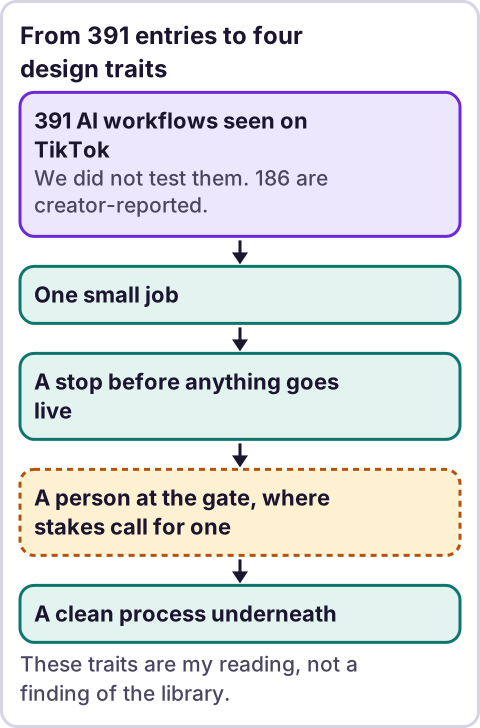
Diagram: From 391 entries to four design traits.
What is the AI in the Wild library?
It is a catalogue we keep at AI in the Wild. Each entry sums up one TikTok video about using AI: what the creator says they did, the steps, the tools and who it is for. Each entry also carries an evidence label and a list of caveats. The data behind this post was generated on October 23, 2026, and it records each entry as approved that day.
What do the 391 entries cover?
I counted the library's data on October 31, 2026. The entries come from 258 different creators.
| Count | What |
|---|---|
| 190 | Workflows (steps someone says they followed) |
| 104 | Frameworks (a way of thinking or sorting) |
| 97 | Tool spotlights (a tool shown or pitched) |
By topic, the largest groups are software (90), automation (62), content (51), business operations (41), learning (40), creative (38) and thinking (38). Career has 19 and security has 12.
An entry can list more than one role. The most common are founder (186), engineer (164) and creator (162), then marketer (80) and operations (69). The most common tools are Claude (70), Claude Code (70) and ChatGPT (63), then Cursor (30) and Lovable (16). Tool names come from video captions, so some are as heard and may be wrong.
How reliable are the entries?
Not very, and the library says so. Each entry has one of four evidence labels. The site describes them in these words:
| Label | Entries | What the site says it means |
|---|---|---|
| Creator-reported | 186 | "The creator describes it and says it worked. We did not verify the result." |
| Advice | 87 | "A method or suggestion. No result is shown." |
| Promotional | 75 | "A pitch. Treat any numbers or claims as unproven." |
| Thesis / opinion | 43 | "A point of view, not a tested method." |
None of the four labels means "tested." The data also records that for every entry the transcript was reviewed and the visuals were not. In 354 entries the evidence note mentions captions. Of the 391 entries, 390 carry at least one caveat. The most common, on 70 entries, is that the captions are auto-generated and may contain errors.
Which workflows put a stop before anything goes live?
I ran a rough keyword search of my own over every entry's summary and steps. It looked for words such as review, approve, verify and check. It matched 102 of the 391 entries. A keyword match is not a quality score, and it misses entries that describe a check in other words. Here are three entries that show the trait. All three are labeled creator-reported or advice, so treat them as ideas.
- Bulk ads that arrive paused. A paid media buyer says he has Claude Code build a sheet of ad URLs, copy and videos, uploads it to a bulk tool, and the ads land in the account paused. He then reviews them by hand and sets them live. The library's caveat: the five-minute claim is self-reported. The design is the point: a script does the repeat work, and a person opens the gate.
- A skill that waits before it changes itself. A creator describes a skill that reviews a Claude session, waits until a correction has been said twice, and shows exact line changes for approval before editing. The caveat: results are not shown in the captions.
- Research in a sandbox first. A creator describes letting Claude read GitHub repos without cloning, cloning the chosen one into a sandbox, running a security check and verifying the result. The caveat: the creator says it saved hours and we saw no proof, and the sandbox and security methods are not detailed.
What does "fix the process first" look like?
One advice entry says many workflows that businesses want to automate are old workarounds. It suggests documenting each step, asking whether it exists only because past technology could not do better, and keeping a person in command with clear ownership. This matches how we work: the rules come first, as in our post on AI agents vs. automation. The library's caveat is that the speaker's 85 percent failure figure is his claim and not sourced, so I do not repeat it as a fact.
What claims should you skip?
- Pitches with numbers. One promotional entry says a router cut a team's bill by 80 percent. The library marks it self-reported and not verified, and notes it includes a referral code.
- Any entry labeled Promotional. There are 75. The site's own note says to treat any numbers or claims as unproven.
- Setup steps that are not shown. Several caveats say the steps are second-hand, summarized or not explained.
- Time-saved claims. "Minutes instead of hours" is a claim, not a measurement. We verified none of them.
Which design traits are worth copying?
This is my reading of the entries above, not a finding of the library.
- One small job. The paused-ads workflow does one thing: get ads into an account.
- A stop before anything goes live. The ads wait paused. The skill waits for a repeat and asks before it edits.
- A person at the gate, where the stakes call for one. In the ads example a person reviews by hand. In the skill example a person approves the line changes. In the sandbox example the creator says Claude runs the checks, so I would still want a person to look before anything real depends on it.
- A clean process underneath. The advice entry says to fix the steps before you add AI.
These traits fit the stance we use: AI writes the code, plain automation runs it, and an LLM shows up only where the input is messy and a person checks the result.
Where does an LLM fit in this?
In the workflows that seem sturdiest, an LLM sits at a messy step, such as reading a folder of files and building a sheet, and the result is checked before it goes live. The steps around it, such as uploading rows and setting ads live, are plain steps. When you try a workflow from a video, run it first on fake or low-risk data and decide in advance who checks the output. I have not tested any of the entries above.
Where this has limits
- We tested none of these workflows. The library records what creators say.
- The counts are from the library's data on October 31, 2026. The library can change.
- Reviews used captions and transcripts, not the visuals. Tool names may be wrong.
- My keyword count is rough. It shows the search I ran, not a quality measure.
- The design traits are my reading, not a finding of the library.
- I have no data on how many people tried these workflows, and I give none.
- No ReRev prices and no promises about results.
If you want your team to learn to test a workflow before they trust it, see our AI and automation training for teams or tell us which workflows you have seen. Do not send customer data, passwords or keys.
Frequently asked questions
What is AI in the Wild?
A library of 391 entries, each summing up an AI workflow, framework or tool from a TikTok video, with an evidence label and caveats.
Are the workflows in the library tested?
No. Each entry records what a creator says. The most common label, with 186 entries, means the creator says it worked and we did not verify it.
Which kinds of entry should I trust least?
Entries labeled Promotional, which the site describes as a pitch whose numbers or claims are unproven.
What do the better workflows have in common?
In my reading: one small job, a stop before anything goes live, and a person approving where the stakes call for it.
Can I copy a workflow from a video?
Treat it as an idea. Try it on fake or low-risk data first and decide who checks the output.
Where can I see the library?
At AI in the Wild on this site.