Blog / Construction Operations
Construction Document Control in Google Drive: Folders, Naming and Permissions
By Keyona Meeks, Founder, ReRev Labs · Oct 31, 2026 · 9 min read
The short answer: Document control in Google Drive comes down to three decisions made once and kept: one folder layout for every job, one file naming rule, and a short list of who can do what. Put the job in a shared drive so the files belong to the company and not to whoever uploaded them. Use a name pattern that starts with the job number and ends with a revision, and check names with a Sheets formula. Give most people Viewer or Contributor access. This is tracking only. What you must keep, for how long and who may see it is a question for your attorney and your contract.
By the end of this post, you'll be able to:
- Set up one folder layout that every job copies.
- Write a file naming rule and check names against it.
- Choose a permission level for each kind of person.
- Know what Drive does not decide for you.
I sell build work, and I am not a document controller, a contractor or an attorney. I have no field experience to offer, and nothing here tells you what records you must keep. This is about keeping files findable and keeping the wrong people from changing them. The person running the project still decides what goes in.
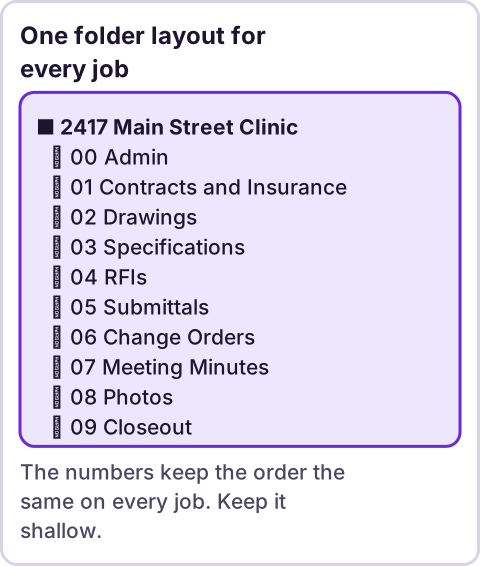
Diagram: One folder layout for every job.
Why does a shared drive matter here?
Files in someone's My Drive belong to that person. When they leave, the files can leave with them. A shared drive is owned by the organization. Google's page on how file access works in shared drives, which I read on October 31, 2026, describes five access levels: Manager, Content manager, Contributor, Commenter and Viewer. Source: How file access works in shared drives.
I read that page through a tool that summarizes, so check the table against the live page. What I took from it:
- Manager: "Can add or remove members of a shared drive."
- Content manager: "Can add or remove people and groups on specific folders in a shared drive."
- Contributor: "Can create and add files, can create folders."
- Commenter: "Can comment on files."
- Viewer: "Can view files and folders."
The page also says only Managers can permanently delete files in the Trash, and that Managers and Content managers can move files and folders to the Trash. Moving files out of a shared drive needs Manager access. I did not confirm which Google Workspace plans include shared drives, so check yours before you plan around them.
What folder layout should every job use?
One layout, copied for every job, so nobody has to ask where something goes. A starting point you can change:
2417 Main Street Clinic
  00 Admin
  01 Contracts and Insurance
  02 Drawings
  03 Specifications
  04 RFIs
  05 Submittals
  06 Change Orders
  07 Meeting Minutes
  08 Photos
  09 Closeout
The numbers keep the order the same on every job. The job number goes in the top folder name. Keep the layout shallow. A file three folders down is a file nobody finds.
If you want a new job to build this layout for you, that is a job for a small script reading a sheet. I describe one approach in a separate post that is not published yet.
What file naming rule works?
One pattern, short enough that people will follow it. This is mine, not a standard:
JOBNUMBER_TYPE_Description_Rnn.ext
2417_RFI_Door-hardware_R02.pdf
2417_DWG_A101-Floor-plan_R00.pdf- The job number is four digits.
- The type is one of a fixed list: RFI, SUB, DWG, SPEC, CO, INV, PHO, MTG.
- The description uses letters, digits and hyphens, with no spaces.
- The revision is R and two digits. R00 is the first issue.
The point of the revision is to stop people from naming a file "final" and then "final 2." A new version gets the next number. The old one stays where it is.
How do you check names in a sheet?
Paste the file names into column A of a sheet. In B2 enter:
=REGEXMATCH(A2,"^\d{4}_(RFI|SUB|DWG|SPEC|CO|INV|PHO|MTG)_[A-Za-z0-9-]+_R\d{2}(\.[A-Za-z0-9]+)?quot;)It returns TRUE for a name that fits and FALSE for one that does not. Google's page for REGEXMATCH gives the syntax as REGEXMATCH(text, regular_expression), says "Google products use RE2 for regular expressions," and says the function "only works with text (not numbers) as input." Source: REGEXMATCH, read on October 31, 2026.
I tested the pattern itself in a Node script against 13 made-up names. Four good names passed: each with a four-digit job number, a listed type, a hyphenated description and a revision. Nine bad names failed, as they should: spaces in the description, a one-digit revision, a lowercase type, a three-digit job number, an unlisted type, a leading "Copy of," and an empty cell. All 13 behaved as expected.
That test ran the pattern in JavaScript, not in Google Sheets. The page I read does not say whether matching is case-sensitive, so I could not confirm that. Paste a lowercase type into a test cell and see what your sheet does. Then fix the pattern if you need to.
Who gets which permission?
Start from the least access that lets someone do the job.
| Person | Level | Why |
|---|---|---|
| Project manager | Content manager | Can manage who sees which folder |
| Project engineer, document controller | Contributor | Can add files and create folders |
| Superintendent | Contributor or Commenter | Adds photos, marks up files |
| Owner or architect's reviewer | Viewer or Commenter | Reads and comments, cannot change |
| Company admin | Manager | Adds and removes members |
That table is my suggestion, not Google's. One caution from the Drive page I read: as I understood it, in Google Drive for desktop and on Chrome OS, Contributor access is read-only, so a contributor who works through the desktop app may need Content manager to upload. I read this on a summarized page. Test with a real contributor account.
What about people outside your company?
Subs, owners and architects are outside the organization. The shared drive page says Managers and admins can block sharing with people outside the organization, and that when this restriction is not set, Managers, Content managers and Contributors can share files with people and groups. Sharing with people without Google Accounts depends on whether the administrator permits visitor sharing.
So the first question is whether your admin allows outside sharing at all. Ask them. Then decide who may share, and share folders, not individual files, so the people leave when the folder access is removed.
For files in My Drive, Google's sharing page describes Viewer, Commenter and Editor, and link settings. It says "If you allow access to anyone with the link, your folder won't restrict who can access it." Source: Share files from Google Drive, read on October 31, 2026. For project documents, restricted access is the safer default. Check what your link settings are.
How long do you keep the files?
That depends on your contract, your state and your insurer, and I cannot tell you. As one official example for a narrow case: the federal acquisition rule on contractor records, FAR 4.703, says contractors "shall make available records, which includes books, documents, accounting procedures and practices," and gives a period of "3 years after final payment" unless another clause or period applies. Source: FAR 4.703, read as an excerpt on October 31, 2026. That rule is for contractors on federal contracts. It is not a rule for your private job. Ask your attorney what applies to you, and write the answer into the folder layout, not into someone's memory.
What should a person always check?
- Which version is current. A naming rule helps. Someone still has to issue the revision.
- Who has access. Review the member list when the job starts and when it ends.
- What goes into closeout. The contract decides.
- Whether a file belongs in the shared folder. Some records, such as tax forms, should sit somewhere with narrower access.
Where does an LLM fit in this?
An LLM can help with the messy part: reading a pile of badly named files and suggesting a correct name for each, or sorting photos by what they show. A person should check the suggestions before anything is renamed, because a wrong name looks the same as a right one. The folder layout, the naming check and the permission list are plain rules, and they do the same thing every time. My stance: AI writes the code, plain automation runs it, and an LLM shows up only where the input is messy and a person checks the result. For other jobs worth automating next, see what to automate first.
How do you roll this out on one job?
- Create the shared drive, or a top-level folder in an existing one.
- Build the layout once and save it as the template.
- Write the naming rule on one page and put it in
00 Admin. - Add people at the levels in the table. Remove anyone who does not need access.
- Rename the first week of files by hand. Check them with the sheet.
- Review the member list at the end of the job.
Where this has limits
- I did not use this on a live project. The layout and permissions come from Google's documentation and my own suggestion.
- I am not a document controller, an attorney, an insurer or a safety professional. Check with an attorney, insurer or safety professional on what you must keep and who may see it.
- I read the Google pages and FAR 4.703 through a tool that summarizes or excerpts. Check the live pages.
- The naming pattern was tested in JavaScript, not in Google Sheets. I could not confirm case sensitivity.
- I did not confirm which plans include shared drives.
- The FAR rule is a narrow federal example.
- No ReRev prices and no promises about results.
If you want help turning this into a system that sets up each job and checks the files, see our AI operations service or tell us where documents get lost. Do not send drawings, contracts, passwords or login details.
Frequently asked questions
What is construction document control?
The practice of keeping project files organized, named consistently, versioned and limited to the right people. Your contract may define more.
Should project files live in a shared drive or in My Drive?
A shared drive is owned by the organization, so files do not leave when a person does. Check that your Google Workspace plan includes shared drives.
What should a file name include?
A job number, a document type, a short description and a revision. The pattern here is my suggestion, not a standard.
Who should be able to delete project files?
Google says only Managers can permanently delete items from the Trash. Keep that group small.
How long should I keep construction records?
It depends on your contract and your state. Ask your attorney. FAR 4.703 is an example for federal contractors only.
Can Drive check file names for me?
A sheet formula can compare pasted names to a pattern. Drive itself does not enforce names.
Read next: A Drive folder for every new project automates the folder skeleton this post organizes, and the transmittal log tracks the drawings that leave it.