Blog / Small Business Automation
Can Google Calendar Replace Calendly? Appointment Schedules Compared
By Keyona Meeks, Founder, ReRev Labs · Oct 31, 2026 · 7 min read
The short answer: For one person offering one-to-one booking, Google Calendar's appointment schedules can replace Calendly. Google's help page says: "With appointment schedules, you can manage your availability and let people book time with you directly in Google Calendar." Where Calendly goes further is team scheduling. Its help page lists Round Robin, Collective and Group events, each tied to certain plans. Which Google features you get depends on your Google plan, so check Google's comparison page for your account before you cancel anything. This is as of October 30, 2026.
By the end of this post, you'll be able to:
- Tell whether a Google booking page covers what you use Calendly for.
- Find out which Google plan features you actually have.
- Know where Calendly's team options go further.
- Run a short test before you cancel.
If you use Calendly so that clients can pick a time with you, you may be paying for something your calendar already does. If you use it to share bookings across a team, that changes. This post compares what the two companies say on their own help pages. I did not use either product to build it, and I do not quote prices. It is one of five tools we rebuild for free. See how to replace paid software subscriptions for the others.
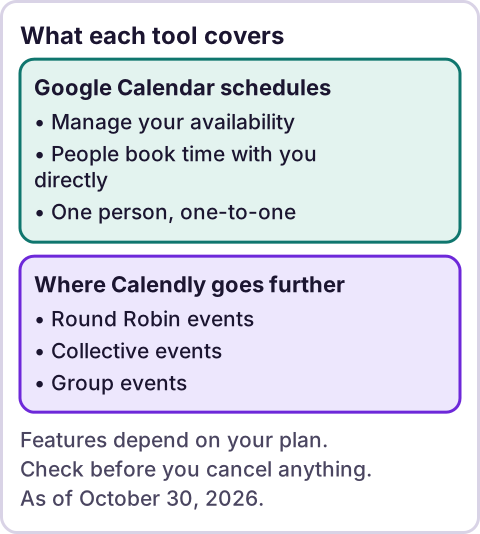
Diagram: What each tool covers.
What does Google Calendar's booking page do?
Google's help page on appointment schedules describes a booking page that shows the times you are available, which you can share by link or embed on your website. When someone books, the appointment is added to your calendar. Source: Learn about appointment schedules in Google Calendar, read as an excerpt on October 30, 2026.
That page links to separate guides for checking availability across calendars and for requiring payment. It gave no details on those, so I rely on the comparison page below.
Which Google plans get which features?
This is the part that decides it. Google has a page called "Compare premium features for appointment schedules." I read it as an excerpt. It says: "With a personal Google Account or Workspace Business Starter plan, you can create a single booking page" and "Some features require an eligible Google Workspace or Google One subscription." Source: Compare premium features for appointment schedules.
My summary of its chart, not a quote:
- More than one appointment schedule, automatic email reminders and checking availability across multiple calendars are listed for all the plans in the chart.
- Accepting payments and verifying emails to prevent spam bookings are listed for Workspace Individual and the Business, Enterprise, Education and Nonprofits plans, and not for Google One.
- Adding schedules to secondary calendars and adding up to 20 co-hosts are listed for Business Standard and Plus, Enterprise Standard and Plus, Education and Nonprofits.
Both pages put automatic email reminders behind a paid plan. The first page says a paid subscription lets you "unlock a professional booking page, email reminders, paid appointment bookings, and more." The comparison page's chart columns are all subscription types, and it says a personal Google Account or Workspace Business Starter plan gets a single booking page. If reminders matter to you, check your own account before you cancel.
What does Calendly do that this does not?
Calendly's help page on multi-person scheduling lists these options, quoted from the excerpt I read:
- Round Robin: "Rotate meetings among multiple hosts based on availability." The page says it is available on its Teams and Enterprise plans.
- Collective: "Show only times when all selected hosts are free." Available on Standard, Teams and Enterprise plans.
- Group: "Let one host meet with many invitees in the same time slot." Available on Standard, Teams and Enterprise plans.
Source: Multi-person scheduling options for your organization, read as an excerpt on October 30, 2026. The page also says each host in Round Robin and Collective events needs their own paid seat.
Google's chart lists co-hosts, up to 20, on some plans. I did not find a Google equivalent of rotating meetings between hosts, and I did not look hard for one. If you need rotation or a team routing form, this is where a paid Calendly plan earns its keep.
What do you give up?
- Team rotation and routing. See above.
- Anything I did not compare. That includes integrations, branded pages, reports and the details of each plan. Make a list of what you use in Calendly today.
- Support. Google's help pages are what you have.
Which setup suits which person?
| If you are | Probably |
|---|---|
| One person with clients who book calls | Google's booking page |
| A small team where each person has their own calendar | Google, one page each, if the plan allows it |
| A team that rotates leads among hosts | Calendly Round Robin, or a custom build |
| Someone who takes payment at booking | Check the payment row in Google's chart for your plan |
This table is my judgment from the pages above, not a promise.
How do you test before you cancel?
- List what your Calendly event types do: length, buffers, questions, reminders, payment.
- Set up the same on Google's booking page and book it yourself from a different account.
- Check the confirmation email, the calendar entry and any reminder.
- Share the new link with one friendly client for a week.
- Cancel Calendly only after real bookings land correctly.
Where does an LLM fit in this?
Not in the booking. A time slot, a buffer and a reminder are plain rules, and they do the same thing every time. An LLM can help you write the intro text on the page or sort which event types you really use. A person should check the result. My stance: AI writes the code, plain automation runs it, and an LLM shows up only where the input is messy and a person checks the result. For other jobs worth moving off paid tools first, see what to automate first.
Where this has limits
- I did not use Google's booking page or Calendly for this post. I read three help pages as excerpts.
- Plans change. Google's eligibility chart and Calendly's plan notes are as of October 30, 2026.
- Reminders depend on your Google plan. Check your own account.
- I did not look for a Google equivalent of Round Robin hard. I may have missed one.
- I did not compare integrations or reports.
- No ReRev prices and no promises about results.
If you would like us to rebuild your booking setup on your own accounts, see the free rebuild offer on /letstalk. Bring your list of event types. Do not send passwords or login details.
Frequently asked questions
Can Google Calendar replace Calendly?
For one-to-one booking by one person, often yes. For rotating meetings among a team, Calendly's Round Robin goes further.
Does Google Calendar have a booking page?
Yes. Google's help page says appointment schedules let people book time with you directly in Google Calendar.
Which Google plan do I need?
It depends on the feature. Google's comparison page says a personal account or Workspace Business Starter can create a single booking page. Other features need other plans.
Does it take payments?
Google's chart lists accepting payments for some plans, not for Google One. Check the chart for your plan.
What does Calendly's Round Robin do?
Its help page says it rotates meetings among multiple hosts based on availability, on its Teams and Enterprise plans.
When should I cancel Calendly?
After the new setup has handled real bookings correctly.