Blog / Technical Guides
Deploy a Lovable Site to Vercel With Your Own Domain
By Keyona Meeks, Founder, ReRev Labs · Oct 31, 2026 · 9 min read
The short answer: Sync your Lovable project to GitHub, import the repository into Vercel, check the site on its vercel.app address, then add your domain under the project's Domains settings and put the DNS records Vercel shows you at your registrar. Vercel's own page for Lovable says newer Lovable projects deploy with no extra configuration. Older ones, built as a plain Vite and React Router site, may need a one-line rewrite file so inner pages do not show a 404. I followed Vercel's and Lovable's documentation. I did not run this on a live project.
By the end of this post, you'll be able to:
- Tell which kind of Lovable project you have.
- Get it onto Vercel through GitHub.
- Point your own domain at it without breaking your email.
- Check that inner pages and the secure padlock work.
You built a site in Lovable. You want it on your own domain, hosted somewhere you control. My other guide, how to deploy a Lovable website to your own domain, covers one route: build on Netlify, download the files and upload them to your own web host. This post is a shorter second route: host the site on Vercel and connect your domain there. I do not repeat the Netlify steps.
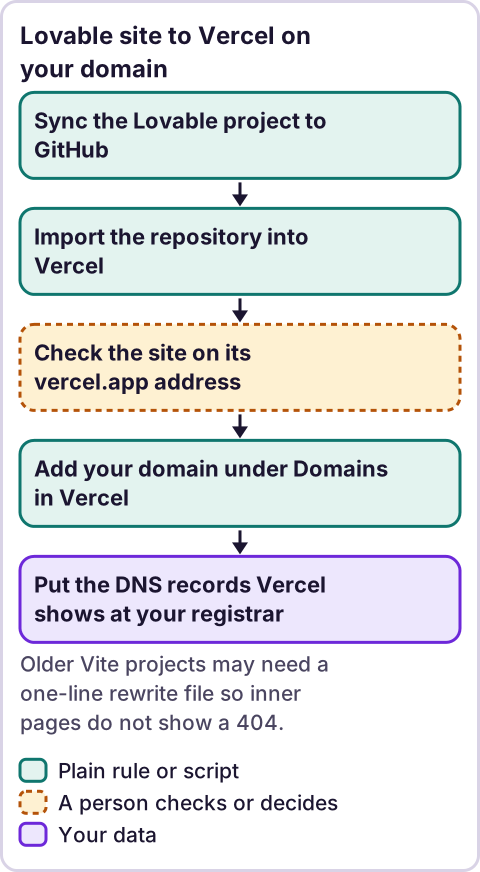
Diagram: Lovable site to Vercel on your domain.
Which kind of Lovable project do you have?
This decides how much work the deploy is. Vercel's page for Lovable says "Lovable projects use TanStack Start as their underlying framework, so they deploy to Vercel with zero configuration." A note on that page says zero-configuration detection "requires @lovable.dev/vite-tanstack-config version ^2.6.2 or higher in your project." Source: Deploy a Lovable app on Vercel, page dated July 10, 2026, checked October 30, 2026.
Both pages came through a fetch tool that returns excerpts, not the full page.
So open your project's package.json file on GitHub and look for @lovable.dev/vite-tanstack-config and its version. If it is there at ^2.6.2 or higher, you match what Vercel describes. If it is missing and you see react-router-dom and vite, you probably have an older single-page project. That last line is my reading, not a statement from either company.
How do you get the project into GitHub?
Lovable's GitHub page, which I read through a summarizing tool, says to open the project's GitHub settings from Project settings → Git → GitHub, or from the Chat actions menu, and click Connect next to the workspace connection. A workspace admin or owner must first add a GitHub workspace connection. Lovable then creates a new repository and starts a two-way sync. Source: Sync your Lovable project with GitHub, checked October 30, 2026. The page also says "Lovable only edits and syncs one branch at a time."
Because I read a summary, check the button names against the live page.
How do you deploy it on Vercel?
Vercel's page gives two steps after the sync: "Import the repository from vercel.com/new. Vercel detects the framework and deploys the project automatically." It adds that "every change you make in Lovable syncs to GitHub and triggers a new deployment on Vercel." Source: same Vercel page.
You need a Vercel account and a GitHub account connected to both Lovable and Vercel. I did not open Vercel's import screen, so I cannot give button names. Follow what the page shows.
For a one-off deploy with no repository, the page says you can download the project as a .zip and drag it into Vercel Drop. It recommends GitHub sync so later changes deploy on their own.
Does the site work before you add your domain?
Check this first. Vercel gives each deployment a vercel.app address you can open before you touch your domain. Source: Adding & Configuring a Custom Domain, page dated September 16, 2026, checked October 30, 2026.
Open that address. Click through every page. Then refresh on an inner page, such as your contact page, and open an inner link in a new tab.
If an inner page shows a 404 on refresh, read the next section. If everything works, skip it.
What if inner pages show a 404?
This happens on single-page sites. Vercel's guide says "Vercel resolves every URL as a server-side filesystem path by default." Lovable's page says "If direct URL navigation returns a 404, configure a fallback rewrite so all routes serve /index.html." Sources: Vercel's guide to deployed projects giving a 404 and Lovable's page on deploying and hosting outside Lovable, both checked October 30, 2026.
The fix in Vercel's guide is a file named vercel.json in the root of the project, next to package.json:
{
  "rewrites": [{ "source": "/(.*)", "destination": "/index.html" }]
}
Add it on GitHub, commit it, and let Vercel redeploy. I think this applies to older projects. I did not confirm whether Vercel needs it for newer projects, and Vercel's Lovable page does not mention it. Test first. Add the file only if you see the 404.
How do you add your domain in Vercel?
Vercel's page says to manage all domain settings from Settings and then Domains in the sidebar. Pick the project on the dashboard, open Settings, select Domains, click the Add Domain button and type your domain. Source: Adding & Configuring a Custom Domain, checked October 30, 2026.
The page says that adding an apex domain, such as example.com, prompts you to add the www subdomain too. Choose the address you want people to see, add both, and set one to redirect to the other. I did not confirm the redirect screen, so follow what Vercel shows.
Which DNS records do you add?
For an apex domain the page says "you will need to configure it with an A record." For a subdomain it says to "configure it with a CNAME record. Each project has a unique CNAME record".
Use the values Vercel shows for your project. Do not copy values from an article, including this one. Vercel's page says to use the values shown for your project rather than another project's records.
If you do not know what an A record or a CNAME is, read the DNS crash course for founders and clients first. Then open your registrar or DNS provider, add the records and save.
How do you change DNS without breaking your email?
This is the step people get wrong. You can connect a domain by adding records at your current provider, or by moving your nameservers to Vercel. They are not the same.
Vercel's page includes a warning to copy your existing DNS records, including MX records, before you change nameservers.
In plain words: if you only add the A or CNAME record at your current provider, the rest of your records stay where they are. If you move the nameservers, everything that was at your old provider has to be copied first, or your email can stop arriving. That is my reading of the warning, so for a domain that also runs email, the first option looks safer. Source: same Vercel page.
Before you change anything, copy a screenshot of every record at your current provider. If something breaks, you can put it back.
How long until it works, and what about the padlock?
Vercel says "DNS changes can take time to propagate." After you save the records, the Domains page shows whether Vercel sees a valid configuration. Vercel's guide to setting up a custom domain says "Vercel automatically provisions an SSL certificate after DNS verification succeeds," and that it "typically provisions within a few minutes of DNS verification." It also says "Verified ownership alone does not mean the DNS configuration is valid," so read the status on the Domains page and do not stop at "verified."
If the page shows a problem, check that your records match the values shown for your project.
What should you check before you call it done?
- Open your domain with and without www. One should redirect to the other.
- Check the padlock.
- Refresh on an inner page.
- Submit your contact form, if you have one. If the form posts somewhere, check it still works from the new address.
- If your site uses environment variables, Lovable's page on hosting outside Lovable says "Environment variables prefixed with
VITE_are embedded at build time, not runtime." So they have to be in place in Vercel before it builds. I could not confirm from the pages I read where Vercel keeps them, so check Vercel's docs. - Send yourself an email from and to your domain, if you use it for email.
- Update links you control that point at the old address.
What about the old hosting?
If your domain was connected to Lovable's own hosting before, you will be pointing it somewhere else. I could not confirm what Lovable needs you to do on its side, such as removing the domain from your project. Check Lovable's custom domain page before you switch, and do not delete anything until the new site works.
Where does an LLM fit in this?
Not in the DNS. Records are exact values, and plain rules check them better than a model. An LLM can help you read an error message, or draft the vercel.json file. A person should read what it wrote and test the site. My stance: AI writes the code, plain automation runs it, and an LLM shows up only where the input is messy and a person checks the result. Setting this up once is also a good moment to look at which paid tools you could move onto your own accounts. See how to replace paid software subscriptions.
Where this has limits
- I did not run this on a live project. The steps come from Vercel's and Lovable's documentation.
- I read some pages through a tool that returned summaries or excerpts. The Lovable GitHub page was a summary. Check button names against the live pages.
- Docs change. Vercel's Lovable and domains pages carry dates in July and September 2026. Everything here is as of October 30, 2026.
- I do not know your project. The older or newer test is my reading. The
vercel.jsonfile is a fix to try if you see the 404, not a step to add always. - I do not cover wildcard domains, email setup or Cloudflare. I did not research them.
- I do not quote prices. Check Vercel's own plan pages for limits that apply to you.
If you want a hand moving a site or a tool onto your own accounts, see the free rebuild offer on /letstalk. Bring the address of your site and the tools you pay for. Do not send passwords or login details.
Frequently asked questions
Can I host a Lovable site on Vercel?
Yes. Vercel has a page for it. Sync the project to GitHub, import the repository and Vercel deploys it.
Do I need to change any settings for a Lovable project on Vercel?
Vercel says newer Lovable projects deploy with zero configuration, as long as the project's config package is at the version it names. Older projects may need a rewrite file.
Why do my inner pages show a 404 after I refresh?
On a single-page site, the server has no file at that address. A rewrite that sends every address to index.html fixes it.
Do I have to move my nameservers to Vercel?
Not for the basic setup. The page describes adding an A or CNAME record. I did not confirm every case, so read the page for your domain.
Will my email stop working?
Not if you only add the website's A or CNAME record. If you move nameservers, copy your existing records first, including MX records.
How long does it take?
Vercel says DNS changes can take time to propagate, and the certificate typically provisions within a few minutes after DNS verification.