Blog / Technical Guides
www or No www? Pick One for Your Lovable Site and Redirect the Other
By Keyona Meeks, Founder, ReRev Labs · Oct 31, 2026 · 6 min read
The short answer:
www.example.comandexample.comare two different addresses, and a site can answer on both. Pick one as your main address and send the other to it with a permanent redirect, so people and search engines see one site. Google's guidance is to pick one address as canonical and redirect the others to it. Which one you pick matters less than being consistent. Check the result with four curl commands. I could not read the redirect steps for Lovable or any host, so I give the idea and the test, not the click path. We sell build work, so weigh this with that in mind.
By the end of this post, you'll be able to:
- Say why www and non-www count as different addresses.
- Pick one and say why.
- Know which kind of redirect to use.
- Check your setup with four commands.
I sell build work. For the DNS basics behind this, see the DNS crash course for founders and clients. For putting a Lovable site on your own domain, see how to deploy a Lovable website to your own domain.
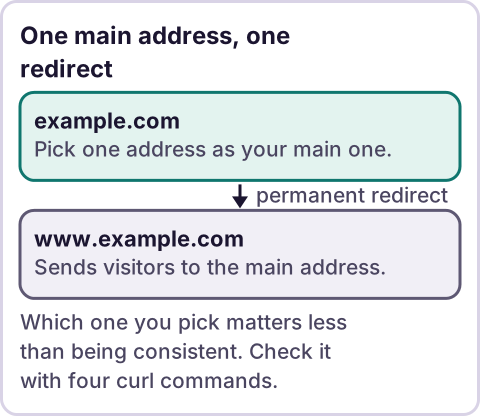
Diagram: One main address, one redirect.
Why does this matter?
If your site answers on both addresses and shows the same page on each, a visitor can reach it two ways, and a search engine may have to guess which one you mean. Google's page on duplicate URLs says "Google will identify which version of the URL is objectively the best version to show to users in Search" when you do not say which you prefer. It uses https://www.example.com as one of three ways the same page can be reached, and recommends you "Pick one of those URLs as your canonical URL." Source: Consolidate duplicate URLs, read as excerpts on October 31, 2026. The tool noted that the page does not address www versus non-www directly. The advice applies to that case.
Which one should you pick?
My judgment, not a rule: pick one and keep it everywhere. We use www on rerev.io. A common reason to pick www is that some DNS setups handle a subdomain more flexibly than a bare domain. I did not confirm that from a source here, so treat it as an idea to check with your DNS provider, not a fact. A common reason to pick the bare domain is that it is shorter. Either works.
What matters: your canonical address, your sitemap, your sharing tags, your analytics and your links all use the same one.
Which redirect should you use?
A permanent one. Google's redirects page says "Use permanent redirects when you're sure that the redirect won't be reverted." Its summary is "Permanent redirects: Show the new redirect target in search results." The temporary kind does the opposite: "Temporary redirects: Show the source page in search results." Source: Redirects and Google Search, read as excerpts. The permanent codes are 301 and 308, and the temporary ones are 302, 303 and 307.
Google's duplicate-URL page also calls a redirect "A strong signal that the target of the redirect should become canonical." It recommends a self-referential canonical tag on the canonical page as well: "We recommend adding this same self-referential rel="canonical" link element to the canonical page itself as well." So use both: a redirect from the other address, and a canonical tag on the main one.
How do you set up the redirect?
It happens at your host or your DNS provider, depending on the setup. I could not read the redirect steps for Lovable or for any host, so I give no click path. Search your host's documentation for "redirect" and for the words www and root. Before you change anything, make sure both names have DNS records and that HTTPS works on both. I could not confirm the certificate details for your host. A redirect that lands on a security warning is worse than none.
How do you check it?
Four commands, one per address. This prints the status code and where it redirects:
curl -s -o /dev/null -w '%{http_code} %{redirect_url}\n' http://example.com/
curl -s -o /dev/null -w '%{http_code} %{redirect_url}\n' https://example.com/
curl -s -o /dev/null -w '%{http_code} %{redirect_url}\n' http://www.example.com/
curl -s -o /dev/null -w '%{http_code} %{redirect_url}\n' https://www.example.com/
I ran the same four against our own site on October 31, 2026. The results:
http://rerev.io/returned 301 tohttps://rerev.io/https://rerev.io/returned 301 tohttps://www.rerev.io/http://www.rerev.io/returned 301 tohttps://www.rerev.io/https://www.rerev.io/returned 200
Three variants end up at one address with a permanent redirect, and the main address answers. The first one takes two hops. Whether fewer hops matters, I did not look into. What you want to see is that every variant ends at your chosen address and that only that address returns 200.
If one variant returns 200 on its own, you have two live copies. If a redirect shows 302 or 307, it is temporary, so fix that.
What else should use the same address?
- The canonical tag on each page.
- The sitemap, with full addresses. Google's sitemap page says "Use fully-qualified, absolute URLs in your sitemaps."
- Your analytics settings and your search console property.
- The links in your email signature and social profiles.
Where does an LLM fit in this?
An LLM can help with the messy part: reading a list of your pages and links and pointing out which use the wrong address. A person should check the list, because it can miss a link. The redirect and the four commands are plain rules, and they do the same thing every time. My stance: AI writes the code, plain automation runs it, and an LLM shows up only where the input is messy and a person checks the result.
Where this has limits
- The Google lines are excerpts. Check the live pages.
- I could not read redirect steps for Lovable or any host. I give no click path.
- My reason for choosing www is an idea, not a confirmed fact.
- The test results are for our own site on one day.
- Search results change slowly. I cannot say how long a change takes.
- We sell build work. Read this with that in mind.
- No ReRev prices and no promises about results.
If you want help with this, or want to claim a free rebuild of a tool you pay for, tell us what you use. Do not send passwords or login details.
Frequently asked questions
Should I use www or non-www?
Either. Pick one and use it everywhere. We use www on our own site.
What kind of redirect should I use?
A permanent one, such as 301 or 308, when you are sure it will not be reverted.
Do I still need a canonical tag?
Google recommends a self-referential canonical tag on the canonical page as well.
How do I check my redirects?
Run curl against all four variants and read the status code and target.
Will the redirect fix my rankings?
I cannot promise that. It removes a source of confusion.
Where do I set the redirect?
At your host or DNS provider. I could not confirm the steps for any particular one.
Read next: Lovable custom domain not working? covers pending, SSL and the other errors that show up around the redirect.