Blog / Technical Guides
Reorder Point Formula in Google Sheets: Lead Time and Safety Stock
By Keyona Meeks, Founder, ReRev Labs · Oct 31, 2026 · 9 min read
The short answer: The reorder point is the stock level at which you place a new order. The common formula is average daily usage times lead time, plus safety stock. In a Google Sheet, give each item a row, work out daily usage from recent sales, add your lead time and a safety stock figure, and compare the result to what you have on hand plus what is already on order. A status column then says Reorder or OK. I tested the formulas in LibreOffice with made-up numbers, not in Google Sheets. The sheet gives you a number. It does not know about a sale next month, a supplier delay or a minimum order size.
By the end of this post, you'll be able to:
- State the reorder point formula and what each part means.
- Build a sheet that calculates it for every item.
- Add a status column that flags what to order.
- Know what the formula cannot see.
If you sell physical products, you have felt both mistakes. You order too late and run out. Or you order too early and tie up cash in boxes. A reorder point is a rule that says when. It is arithmetic, which makes it a good first thing to put in a sheet.
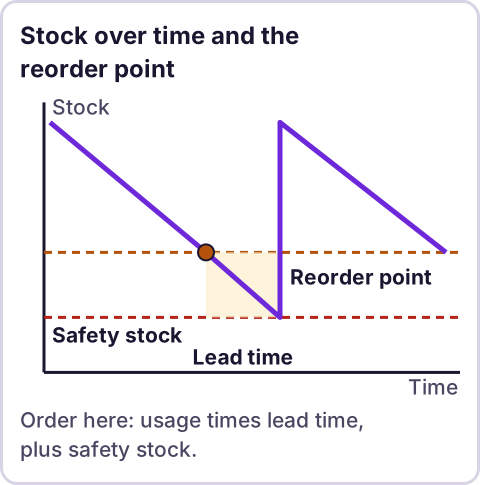
Diagram: Stock over time and the reorder point.
What is a reorder point?
Zoho's inventory guide defines it this way: "A reorder point (ROP) is a specific level at which your stock needs to be replenished." On how to work it out, the guide says to "multiply the daily average usage by the lead time and add the amount of safety stock you keep." It defines safety stock as "The amount of extra stock, if any, that you keep in your inventory to help avoid stockouts." Source: Zoho Inventory, reorder point guide, read as a full article on October 31, 2026.
Written as a formula, that is: reorder point = (average daily usage × lead time) + safety stock. Tractian's glossary gives the same formula: "ROP = (Average Daily Usage x Lead Time) + Safety Stock." Source: Tractian, reorder point, read on October 31, 2026.
Lead time is the number of days between placing an order and having the stock ready to sell. Usage is how many units you sell or consume per day. Safety stock is the cushion.
How much safety stock should you hold?
Zoho's page defines safety stock but, as I read it, gives no general formula for it. Tractian gives one for maintenance and repair supplies, which it describes as a practical formula for that setting: "Safety Stock = (Maximum Daily Usage x Maximum Lead Time) - (Average Daily Usage x Average Lead Time)."
That formula covers the worst case you have seen: your busiest day running into your slowest delivery. It is cautious, and it ties up more stock. It was written for maintenance supplies, so for a product brand it is one reasonable starting point, not a rule. Other methods exist, and I did not research them. Pick a method on purpose, write down which one you used, and revisit it after a few months of real orders.
How do you set up the sheet?
Make a tab named Reorder with these headings in row 1:
| Column | Heading | What goes in it |
|---|---|---|
| A | SKU | Your item code |
| B | Item | Name |
| C | Units sold last window | Total units in the window |
| D | Avg daily usage | Formula |
| E | Max daily usage | Your busiest day, typed in |
| F | Avg lead days | Typical days from order to stock |
| G | Max lead days | Slowest delivery you have seen |
| H | Safety stock | Formula |
| I | Reorder point | Formula |
| J | On hand | Count now |
| K | On order | Units already ordered, not yet received |
| L | Position | Formula |
| M | Status | Formula |
In O1 type Window days and in P1 type 30. That is the number of days that column C covers. It is a setting, so you can change it.
Which formulas do the work?
In row 2:
D2: =IF(C2="","",C2/$P$1)
H2: =IF(OR(D2="",E2="",F2="",G2=""),"",MAX(0,E2*G2-D2*F2))
I2: =IF(OR(D2="",F2="",H2=""),"",ROUNDUP(D2*F2+H2,0))
L2: =IF(J2="","",J2+N(K2))
M2: =IF(OR(I2="",L2=""),"",IF(D2=0,"No usage",IF(L2<=I2,"Reorder","OK")))
Fill them down. Here is what each does:
- D2 divides recent sales by the window to get average daily usage.
- H2 is the worst-case safety stock above, and it never goes below zero.
- I2 is the reorder point: usage times lead time, plus safety stock, rounded up to a whole unit.
- L2 adds what is on order to what is on hand. I chose that on purpose. If you compare only on-hand stock to the reorder point, you will keep ordering the same item every day while the first order is in transit. That is my design choice, not a point from either source.
- M2 says Reorder when the position is at or below the reorder point. An item with no recent sales says No usage instead.
Blank inputs give blank results, so a half-filled row does not show a false status.
What did the test show?
I tested the formulas in LibreOffice with five made-up items. One item sold 300 units in 30 days, with a busiest day of 12 units, a typical lead time of 10 days and a slowest of 14. The sheet gave an average of 10 a day, a safety stock of 68 (12 × 14 minus 10 × 10), a reorder point of 168 and, with 60 on hand and 20 on order, a position of 80 and the status Reorder. A second item with plenty of stock showed OK. A third with no sales data showed blanks. A fourth with nothing on order treated the blank as zero. A fifth with no sales showed No usage, not Reorder. All five rows matched my hand arithmetic.
I did not test the formulas in Google Sheets. They use only common functions, but type a few test rows and check them against a calculator.
What can the formula not see?
- Seasonality. An average of the last 30 days does not know that demand doubles in November.
- A late supplier. Your lead time is a number you typed. Real lead times drift.
- Minimum order quantities and case packs. The sheet tells you when, not how many.
- A promotion or a stockout. Sales during a stockout understate demand. A promotion overstates it.
- Bad counts. If the on-hand number is wrong, everything after it is wrong.
A person looks at the Reorder list and decides. The sheet's job is to make sure no item slips past unnoticed.
Where does an LLM fit in this?
An LLM can help with the messy part: reading supplier emails and order confirmations and suggesting the lead time each one implies, or reading a sales export and suggesting how to total it by SKU. A person should check the numbers before they go in the sheet, because a wrong lead time looks the same as a right one. The formulas are plain rules, and they do the same thing every time. My stance: AI writes the code, plain automation runs it, and an LLM shows up only where the input is messy and a person checks the result. For other jobs worth automating next, see what to automate first.
How do you test the sheet?
- Enter three items with made-up numbers.
- Work one reorder point out by hand with a calculator. Compare it to the sheet.
- Set the on-hand number just above and just below the reorder point. Watch the status change.
- Add units to the on-order column and watch the position rise.
- Clear the sales cell and confirm the row goes blank.
- Delete the test rows and keep the formulas.
Where this has limits
- I did not use this on a live inventory. The formulas were tested in LibreOffice with made-up numbers, not in Google Sheets.
- The formula sources are two vendor pages. Zoho's guide was a full article. Tractian's page is a glossary entry about maintenance supplies. Neither is a standard.
- The safety stock method is one of several. I did not research the others.
- Counting on-order stock in the position is my choice.
- Averages hide seasonality and supplier delays.
- No ReRev prices and no promises about results.
If you want help turning this into a system that watches your stock and tells you what to order, see our AI operations service or tell us how you decide when to reorder. Do not send sales exports, supplier details, passwords or login details.
Frequently asked questions
What is the reorder point formula?
Average daily usage times lead time, plus safety stock. Two vendor pages give it in the same form.
How do I calculate safety stock?
One method is maximum daily usage times maximum lead time, minus average daily usage times average lead time. It was written for maintenance supplies. Other methods exist.
Should I count stock on order?
I do. Otherwise the sheet keeps flagging an item that you have already ordered.
Does this work in Google Sheets?
I tested it in LibreOffice. The functions are common ones, but check a few rows yourself.
Can the sheet send me an alert?
Not this one. It shows a status. An alert is a separate step.
What window should I use for daily usage?
I used 30 days in the example. Pick a window that fits how your sales behave and change the setting.
Read next: Low-stock alerts email you when a row crosses the point this formula computes, and the purchase order tracker picks up the order from there.