Blog / Technical Guides
The Follow-Up Engine: Draft a Gmail Follow-Up When Nobody Replies
By Keyona Meeks, Founder, ReRev Labs · Apr 6, 2026 · 8 min read
The short answer: Add a Gmail label called
Waiting for replyto any thread where you are waiting on someone. A small Google Apps Script runs each morning. If you sent the last message and nobody answered in 4 days, it writes a follow-up draft in that thread and moves the label. If they replied, it clears the label. You read each draft and press send yourself.
By the end of this post, you'll be able to:
- Set up a Gmail label system that tracks threads waiting on a reply.
- Install a script that drafts a follow-up when nobody answers.
- Change the wait time and the wording.
- Know what to check before you trust the drafts.
I used to be good at meeting people and bad at keeping them. I would leave a good conversation fired up, write a note somewhere and let life happen. Three weeks later I would think about reaching out, then talk myself out of it because too much time had passed.
The version I built for myself starts from a meeting transcript. This post is the smaller one that almost anyone can run: no transcript tool, no CRM, only Gmail and a script.
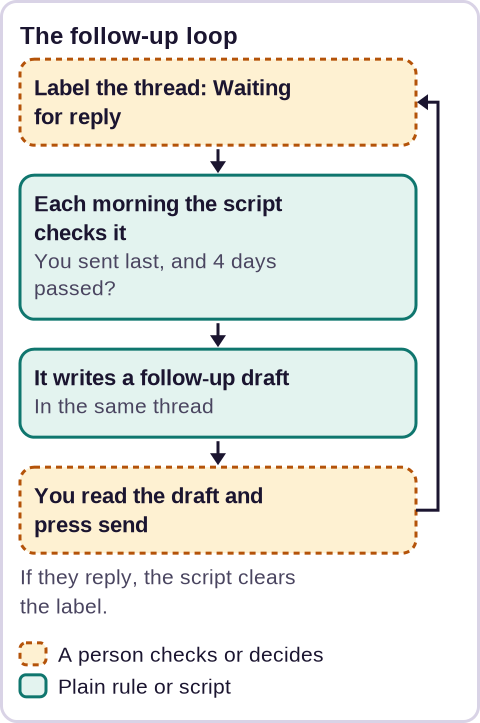
Diagram: The follow-up loop.
What does the script do?
You do one thing: label a thread Waiting for reply after you send something that needs an answer. The script does the rest.
- Each morning it looks at every thread with that label.
- If the last message is from someone else, they replied. The script removes the label.
- If the last message is yours and it is at least 4 days old, the script creates a draft reply in the same thread and moves the thread to
Follow-up drafted. - If the last message is yours and newer than 4 days, it does nothing.
It creates drafts only. It never sends. That is on purpose. A follow-up goes out under your name, and a person should read it first.
How do you set it up?
- Open script.google.com and click New project.
- Delete what is in the editor and paste the code below.
- Click Save.
- In the function list, choose
setupFollowUpTriggerand click Run. Google asks you to allow the script to read and change your Gmail. Read the list. Approve it only if you agree.
// Draft follow-ups for Gmail threads that got no reply. Paste into script.google.com.
const CONFIG = {
  WAITING_LABEL: 'Waiting for reply',   // you add this label to a thread after you send
  DRAFTED_LABEL: 'Follow-up drafted',   // the script moves the thread here
  WAIT_DAYS: 4,                         // draft a follow-up after this many days of silence
  MAX_THREADS: 50,                      // threads handled per run
  BODY: 'Hi,\n\nJust checking whether you had a chance to look at my note below. ' +
        'Happy to answer questions.\n\nThanks'
};

function draftFollowUps() {
  const me = Session.getEffectiveUser().getEmail().toLowerCase();
  const waiting = getOrCreateLabel_(CONFIG.WAITING_LABEL);
  const drafted = getOrCreateLabel_(CONFIG.DRAFTED_LABEL);
  const threads = waiting.getThreads(0, CONFIG.MAX_THREADS);
  const now = new Date();

  threads.forEach(function (thread) {
    const messages = thread.getMessages();
    const last = messages[messages.length - 1];
    const fromMe = last.getFrom().toLowerCase().indexOf(me) !== -1;

    if (!fromMe) {
      // Someone replied. Stop waiting.
      thread.removeLabel(waiting);
      return;
    }
    const days = (now - last.getDate()) / 86400000;
    if (days < CONFIG.WAIT_DAYS) return;

    thread.createDraftReply(CONFIG.BODY);
    thread.removeLabel(waiting);
    thread.addLabel(drafted);
  });
}

function setupFollowUpTrigger() {
  ScriptApp.getProjectTriggers().forEach(function (t) { ScriptApp.deleteTrigger(t); });
  ScriptApp.newTrigger('draftFollowUps').timeBased().everyDays(1).atHour(8).create();
}

function getOrCreateLabel_(name) {
  return GmailApp.getUserLabelByName(name) || GmailApp.createLabel(name);
}
Run setupFollowUpTrigger once. It sets the script to run each morning. Google runs a time trigger at some point inside the hour you pick, not at the exact minute. If you are new to Apps Script, read what Google Apps Script is first.
How do you use it day to day?
- Send your email as usual.
- In Gmail, open the sent message and apply the label
Waiting for reply. The script creates the label the first time it runs. If you want to label threads before that, make the label by hand with the same name. - Each morning, open your Drafts. Any thread with no answer after 4 days has a draft waiting.
- Read the draft. Change the wording so it fits this person. Send it, or delete it.
- If you send a follow-up and still need an answer, add
Waiting for replyagain. The clock starts from your newest message.
How do you change the wait time or the wording?
Edit the CONFIG block at the top of the script:
WAIT_DAYSsets how many days of silence before a draft. Short for a quote someone is expecting. Longer for a note to a busy contact.BODYis the text of the draft. Keep it short and specific to the situation. A draft that says only "just checking in" is easy to ignore.MAX_THREADSlimits how many threads one run handles.
What should you check before you trust it?
I tested the script with made-up threads in a mock harness and a syntax check. I did not run it against a live Gmail account. Test it on your own account with low stakes:
- Send two emails to your own second address.
- Label both
Waiting for reply. - Set
WAIT_DAYSto0and rundraftFollowUpsby hand. - Check that each thread has a draft and moved to
Follow-up drafted. - Open the draft and read the To line. The reply to your own last message should go to the person you wrote to. If it goes to you, stop and do not use the script until you fix that.
- Set
WAIT_DAYSback to4.
Step 5 matters most. I could not confirm from Google's reference how a draft reply behaves when the last message in the thread is your own, so check it on your account first.
What else should you know?
- Aliases. The script decides who sent the last message by looking for your account email in the sender field. If you send from an alias, add that check before you rely on it, or replies may look like they came from you.
- Quotas. Apps Script and Gmail limit how much a script can do each day. See Google's quotas page for the current numbers.
- Out-of-office and auto-replies. An automatic reply counts as a reply. The script then removes the label even though the person has not really answered. Check threads with an auto-reply by hand.
- Not a sequence. This drafts one follow-up per label. If you want a second or third nudge, relabel the thread.
Where does an LLM fit in this?
Not in the timing. Deciding when a thread has gone quiet is a rule, and rules are cheaper and easier to trust than a model for that. An LLM can help write the wording: given the thread, it can draft a follow-up that refers to what you actually asked. A person should read every draft, because a follow-up that gets a detail wrong costs you more than a late one. I wrote about where that line sits in why AI agents break in production, and about the choice between agents and plain automation in AI agents vs. automation.
What does the bigger version look like?
My own Follow-Up Engine starts from a meeting transcript instead of a label. A transcription tool saves the transcript to a shared folder. Claude reads it, pulls out what matters, drafts the follow-up email in Gmail, creates tasks in Google Tasks and updates the contact record in my CRM. The same rule holds there: it produces drafts and records, and I check them.
That version needs a transcription tool, a shared folder, an AI model and a CRM. The label version needs Gmail and the script above. Start with the small one.
Where this has limits
- It drafts. It does not decide. Whether to follow up, and how, is your judgment.
- It only sees threads you label. It does not scan your whole inbox.
- It is untested in a live account. Run the check above first.
- Drafts can pile up. If you do not clear them, you are back to a pile, only in Drafts.
- Email rules apply. If you follow up with people you do not know, laws on commercial email depend on where you and they live (the FTC's CAN-SPAM compliance guide for business is the US starting point, checked October 30, 2026). Check with an attorney if you are unsure.
- Gmail and Apps Script change. Menus and behavior can differ from this post.
If follow-ups, quotes or approvals depend on someone remembering, see our AI-powered operations work or apply on /letstalk. Bring the workflow that eats your week. Do not send passwords or login details.
Frequently asked questions
Can Gmail send a follow-up automatically if there is no reply?
Gmail can remind you about some messages on its own, and its features change. This script is different: you pick the wait time and it writes a draft in the thread. Check Gmail's help for what it offers today.
Why drafts and not automatic sending?
A follow-up goes out under your name. A draft lets you read it, fix the wording and skip it when the person has already answered by phone.
Does it work with Google Workspace accounts?
It should, since it uses the same Gmail service. Your admin may restrict scripts, so ask them if the authorization step is blocked.
Will it follow up on every email I send?
No. It only handles threads with the Waiting for reply label.
Can I use different wait times for different people?
You can make a second label and a second copy of the script with a different WAIT_DAYS. A single script with one wait time is easier to keep working.
What happens if the person replies by phone?
The script keeps waiting until a reply shows up in the thread. Remove the label by hand when the matter is settled.
Read next: Construction bid follow-up puts this same follow-up pattern on bids, with the email templates and the tracker.