Blog / Small Business Automation
Time Audit Template: Find the Hours Your Business Loses
By Keyona Meeks, Founder, ReRev Labs · Oct 31, 2026 · 9 min read
The short answer: A time audit is a one-week log of the repeating tasks in your business, with the minutes each one takes and how often. This template turns that log into hours per year and a verdict for each task. It uses the same three questions as our post on what to automate first: does it happen every week, do the rules fit on an index card, and does the information already live in a tool you use. Paste the headings and formulas below into a Google Sheet. The formulas were tested in LibreOffice, not in Google.
By the end of this post, you'll be able to:
- Set up a two-tab sheet in a few minutes.
- Log a week of tasks and get hours per year for each.
- Read a verdict for each task: automate, tidy first, or leave it.
- Pick the one task to take to a build conversation.
We sell build work, so weigh this post with that in mind.
Our post on what to automate first gives you the filter and a short log method. This post gives you the sheet that does the math for you. When you have a top task, what small business automation costs has the payback formula.
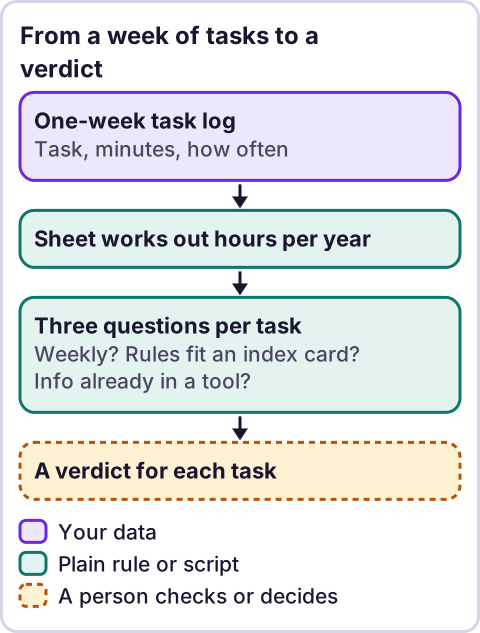
Diagram: From a week of tasks to a verdict.
What is a time audit?
A time audit is a list of what you actually spend time on. You write down each repeating task, how long it takes and how often it happens. Then you add the minutes up. The aim is to find the few tasks that take the most hours and that a script could do. It is not a productivity score for people. Log tasks, not individuals.
How do you set up the sheet?
- Make a new Google Sheet with two tabs. Name the first
Time logand the secondSummary. Use those exact names, because the formulas refer to them. - In
Time log, click cell A1 and paste the headings line below. Each heading lands in its own column. - Click A2 and paste the five example rows. They are made up, so you can see how the sheet reads. Delete them when you start your own log.
- Click H2 and paste the first formula. Click I2 and paste the second. Click J2 and paste the third.
- Select H2 to J2 and drag the fill handle down to row 200.
- In
Summary, click A1 and paste the six lines at the bottom.
The headings, for A1:
Task Who does it Minutes each time Times per week Rules fit on an index card? Info already in a tool you use? Is a wrong answer costly? Happens every week? Hours per year VerdictThe example rows, for A2:
Copy form replies into the client sheet	Office manager	5	10	Yes	Yes	No
Chase unpaid invoices	Owner	20	3	No	Yes	Yes
Weekly status email to clients	Owner	45	1	Yes	Yes	No
Quarterly tax filing	Owner	240	0.08	No	No	Yes
Book new-client calls	Office manager	8	6	Yes	No	No
Formula for H2 (does it happen every week):
=IF(A2="","",IF(D2>=1,"Yes","No"))Formula for I2 (hours per year):
=IF(A2="","",C2*D2*52/60)Formula for J2 (the verdict):
=IF(A2="","",CHOOSE((H2="Yes")+(E2="Yes")+(F2="Yes")+1,"Leave for now","Leave for now","Tidy the process, then automate","Automate")&IF(G2="Yes"," - keep a person approving",""))The six lines for the Summary tab, for A1:
Total hours per year	=SUM('Time log'!I2:I200)
Hours per year in tasks marked Automate	=SUMIF('Time log'!J2:J200,"Automate*",'Time log'!I2:I200)
Tasks marked Automate	=COUNTIF('Time log'!J2:J200,"Automate*")
Biggest task by hours	=IF(MAX('Time log'!I2:I200)=0,"",INDEX('Time log'!A2:A200,MATCH(MAX('Time log'!I2:I200),'Time log'!I2:I200,0)))
Your hourly value (type your own)
Yearly value of the Automate tasks	=IF(B5="","",B2*B5)
For the Yes and No columns (E, F and G) you can add a drop-down list. Select the cells, open the Data menu and look for data validation. I did not confirm the menu steps in Google's help, so use Google's own help if the menu looks different.
What does each column mean?
| Column | What you type | Why it is there |
|---|---|---|
| A. Task | A short name | One line per repeating task |
| B. Who does it | A role, not a name | Shows where the load sits |
| C. Minutes each time | Your best estimate | Time for one go |
| D. Times per week | A number, such as 0.25 for once a month | How often it happens |
| E. Rules fit on an index card? | Yes or No | Can you write the rules down? |
| F. Info already in a tool you use? | Yes or No | Gmail, Sheets, Calendar or a form |
| G. Is a wrong answer costly? | Yes or No | Money, a client or a legal risk |
| H. Happens every week? | Formula | Yes when D is 1 or more |
| I. Hours per year | Formula | C × D × 52 ÷ 60 |
| J. Verdict | Formula | From the three questions and G |
How do you fill it in over a week?
Keep the sheet open, or a note on your phone. Each time you do something that repeats, add a line. Do not wait until Friday, because you will forget half of it. At the end of the week, merge lines that are the same task and add the minutes. For a task that happens less than weekly, use a fraction: once a month is about 0.25 per week, and once a quarter is about 0.08.
The minutes are your own estimates. If you can, time a few tasks with a clock for a day and compare. Do not log private details from clients. Task names are enough.
How does the sheet decide the verdict?
It counts how many of three answers are Yes: happens every week, rules fit on an index card, and info already in a tool. Three Yes gives Automate. Two gives Tidy the process, then automate. One or none gives Leave for now. These steps match the filter in our post on what to automate first. If the answer to "Is a wrong answer costly?" is Yes, the verdict adds - keep a person approving. The rule is the same one our post on AI agents vs. automation uses: where a wrong answer is expensive, a person stays in the approval step.
What do the example rows show?
In the made-up rows, the form-copying task has three Yes answers and comes to about 43 hours a year, so it gets Automate. The status email also gets Automate, at 39 hours. The invoice chase has two Yes answers, so it needs its process tidied first, and because a wrong answer is costly it keeps a person approving. The quarterly tax filing gets Leave for now. On the Summary tab, the five rows total about 193 hours a year, 82 of them in tasks marked Automate. The biggest single task is the invoice chase, but it is not the first to automate. That is why the verdict matters more than the hours alone. These numbers are examples, not findings about any business.
How do you read the Summary tab?
- Total hours per year is the sum of column I.
- Hours per year in tasks marked Automate counts only rows whose verdict starts with
Automate. - Biggest task by hours shows the longest task. Look at its verdict before you act.
- Yearly value multiplies the Automate hours by an hourly value you type. Use your own number. I give none.
What do you do with the result?
- Sort the log by hours per year, largest first.
- Take the top task whose verdict says
Automate. - Write its rules on an index card. If you cannot, it was not ready.
- Use the payback formula in our cost post to see if it is worth building.
- Build it, or bring it to us.
Where does an LLM fit in this?
An LLM can help with the messy input. For example, it can read a week of calendar entries or notes and suggest task lines, so you do not start with a blank sheet. A person checks the list and the minutes, because a model can merge two different tasks or guess a time. The sheet itself is plain formulas. They give the same answer every time. My stance: AI writes the code, plain automation runs it, and an LLM shows up only where the input is messy and a person checks the result.
Where this has limits
- The formulas were tested in LibreOffice only. Nothing was run in Google Sheets. In particular, adding Yes tests with a plus sign (TRUE + TRUE) is how the verdict counts, and I did not check that in Google.
- The minutes are estimates. A wrong estimate gives a wrong ranking.
- The sheet does not know your process. A task can score three Yes and still be a bad fit. Read each verdict.
- It covers 199 task rows. Extend the fill-down if you need more.
- The data validation menu steps are not confirmed.
- The example numbers are made up.
- No ReRev prices and no promises about results.
If you finished your audit and want help with the top task, tell us what it is. We sell this work. Do not send client data, passwords or keys.
Frequently asked questions
How do I do a time audit for my small business?
Log each repeating task for a week with the minutes and how often it happens. Add the minutes up, multiply by 52, and look at the tasks with the most hours.
How long should a time audit run?
One week is a start. Add a second week if your work changes a lot from week to week. That is my suggestion, not a rule.
What counts as a task to log?
Anything you do more than once that follows steps: replies, copying, chasing, reports and bookings.
Do I need to time myself exactly?
No. Estimates are fine for a first pass. Time a few tasks to check your guesses.
Can I use this in Excel?
The formulas are standard. I tested them in LibreOffice. I did not test Excel.
Does the sheet use an LLM?
No. It uses plain formulas. An LLM can help turn notes into task lines, and a person checks them.