Blog / Construction Operations
Where AI Fits in Construction Admin (and Where It Doesn't)
By Keyona Meeks, Founder, ReRev Labs · Oct 31, 2026 · 8 min read
The short answer: In a construction office, plain rules should run the logs: the RFI log, the submittal log, the follow-up reminders. An LLM earns a place in one narrow spot, reading a messy email or a pile of notes and suggesting values for the fields, with a person checking before anything is saved. AI should not decide what a contract means, what a change is worth, whether work is safe or whether a notice is valid. Those belong to a person, and to your attorney, insurer or safety professional where the stakes are high. This is tracking and drafting help only.
By the end of this post, you'll be able to:
- Tell which office tasks suit rules and which suit an LLM.
- Name the tasks AI should not touch.
- Put a human check in the right place.
- Start with one small, low-risk use.
I sell build work and training, and I am not a contractor, a document controller or an attorney. I have no field experience to offer. This post is about the office side: the emails, logs and paperwork. Nothing here tells you what the law, your contract or your insurer requires.
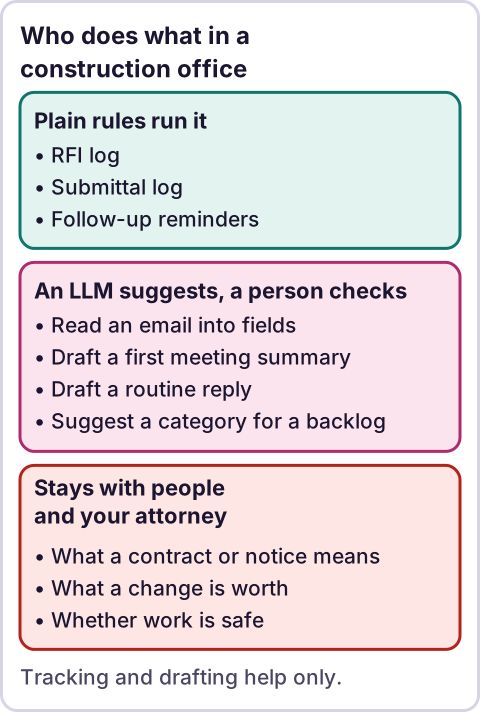
Diagram: Who does what in a construction office.
What is the stance, applied to a construction office?
AI writes the code, plain automation runs it, and an LLM shows up only where the input is messy and a person checks the result.
In practice: the log is a sheet. The rule that flags an RFI with no answer after five days is a formula. The reminder is a script or a filter. None of those need an LLM, and none of them should have one, because you want them to do the same thing every time. The email from a sub that says "per our call, door hardware is changing, see attached" is messy. That is where an LLM may help.
For the longer version of the difference between an agent and plain automation, see AI agents vs automation.
Which office tasks should plain rules handle?
These are well-defined, so rules suit them:
- Logs. RFIs, submittals, transmittals and change requests as rows with dates and statuses.
- Reminders. Days open, days since last follow-up, who owes the next move.
- Naming and filing. Files named to a fixed pattern and checked against it.
- Reports. A weekly summary built from the log.
- Routing. A request goes to the person named for that type.
If you cannot write the rule in a sentence, you are not ready to automate it. A rule that you can state is also a rule you can test.
Where can an LLM help?
Only where the input is messy and the output is a suggestion:
- Reading an email into fields. Suggest a job number, a document type, a due date and a one-line summary from the body of an email. A person confirms before it goes in the log.
- Drafting a first summary. Turn meeting notes into a list of items and owners. A person fixes it.
- Drafting a reply. Offer wording for a routine request. A person edits and sends.
- Sorting a backlog. Suggest a category for a pile of unlabeled files. A person spot-checks.
The pattern is the same each time. The LLM suggests, a person decides, and the result lands in a structure that rules then run.
Where should AI stay out?
These are not close calls:
- What a contract or a notice means. That is for your attorney.
- What a change is worth. Pricing, scope and entitlement are decisions with money and consequences attached.
- Whether something is safe. That belongs to a qualified safety professional.
- Insurance questions. Ask your insurer.
- Lien, payment and deadline decisions. Ask your attorney. A tool can track a date you gave it. It does not know whether the date is right.
- Anything sent outside the company with no review. A wrong message to an owner or a sub is hard to take back.
An LLM sounds equally sure when it is right and when it is wrong. That is why a reader cannot tell the difference from the wording alone, and why the checking step matters.
How do you put the human check in the right place?
Put it where a wrong value would cost something:
- The LLM suggests values into a holding tab, not the live log.
- A person looks at each row beside the original email.
- The person confirms, edits or rejects.
- Only confirmed rows move to the log.
- The log records who confirmed and when.
A check that happens after the data is in the system is a check that gets skipped. Put the gate before the write.
Also decide what data the LLM sees. Emails can include pricing, personal details and contract terms. Read the terms of the tool and ask whoever owns your data policy before you paste anything in. I did not review any vendor's data terms for this post.
How do you start?
Pick one low-risk task. For example, reading incoming RFI emails into a holding tab for review. Run it for a few weeks alongside the manual way. Count how often the suggestion was wrong. Keep the gate in place until the error rate is one you can live with, and you decide that, not the tool.
If you do not know which task to begin with, see what to automate first.
What does team training change?
The tools are easy to use and hard to use well. A team that understands what an LLM does and does not do makes better rules about where to use it. Our training page says "Most AI training teaches you how to prompt. We teach you how to build." It lists a half-day workshop of about four hours, a multi-day program, ongoing coaching and shorter lunch and learns. See AI and automation training for teams and check that page for the current formats. This post quotes no prices and I have none to share.
Where does an LLM fit in this?
Covered above, but to be brief: it reads the messy input and suggests, and a person checks. Everything else in the office workflow stays a plain rule. If a task does not start with messy input, it probably does not need an LLM.
Where this has limits
- This is a judgment piece. I do not offer data on how accurate any model is at reading construction email.
- I have no field experience. I am not a contractor, document controller, attorney, insurer or safety professional.
- I make no claims about what any rule or contract requires. Check with an attorney, insurer or safety professional on anything with legal, insurance or safety weight.
- I did not review any vendor's data terms.
- The training page lines are from our own site. Check the live page for current formats.
- No ReRev prices and no promises about results.
If you want your office team trained to build this kind of workflow, see our training page or tell us what your office handles. Do not send contracts, drawings, passwords or login details.
Frequently asked questions
Can AI handle construction project administration?
Parts of it. Rules suit logs and reminders. An LLM may help read messy emails into fields, with a person checking. It should not decide contracts, pricing or safety.
What should AI not do in a construction office?
Interpret contracts or notices, price changes, judge safety, answer insurance questions or decide lien and deadline matters.
Where do I put the human check?
Before the data is written to the live log, not after.
Is it safe to paste project emails into an AI tool?
That depends on the tool's terms and your own policies. I did not review any vendor's terms. Ask before you paste.
What is a good first task?
Reading incoming RFI emails into a holding tab that a person reviews.
Do you offer training?
Yes. See our training page for current formats.
Read next: The paperwork map shows the office tasks this post sorts into rules, LLM and people, each with its own build.