Blog / Construction Operations
Construction Office Automation in Google Workspace: The Paperwork Map
By Keyona Meeks, Founder, ReRev Labs · Oct 31, 2026 · 10 min read
The short answer: Most construction office paperwork follows one pattern. An item goes out, someone owes an answer by a date, and the office has to notice when the answer is late. Google Sheets can hold the list, a dropdown can hold the status, and a short Google Apps Script can email you when something is overdue. This post maps eight kinds of paperwork to the columns and the due date each one needs. It tracks the paper. Your contract, your state and your insurer decide what the paper must say.
By the end of this post, you'll be able to:
- Name the one pattern behind RFIs, submittals, change orders, COIs, lien waivers and pay apps.
- List the columns and the "late" rule each kind of paperwork needs.
- Find an official written rule to read for each one, as an example of what a contract can say.
- Decide which piece to build first.
A project manager keeps six lists in six places. The RFI log is a spreadsheet. Submittals are in an email folder. Change orders are in someone's head until they become a dispute. Insurance certificates sit in a drawer until a sub shows up on site. Nothing is wrong with any single list. The trouble is that no list tells you what is late.
This post is a map. It is not one big system. It shows the shared pattern, then what each kind of paperwork adds to it.
I sell build work, so you should know I benefit if you hire help. The patterns below are free to copy, and most small offices can run them without us.
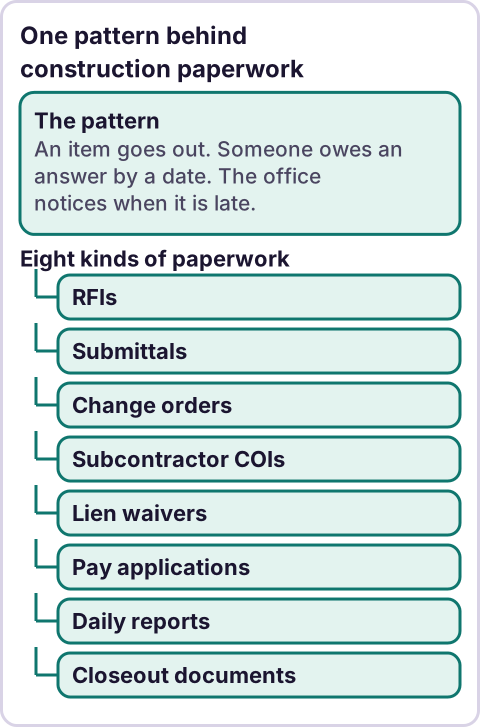
Diagram: One pattern behind construction paperwork.
What is the one pattern behind construction paperwork?
Every item on the list below has the same shape:
- An item goes out. A question, a product submittal, a priced change, a request for payment.
- Someone owes a response. An architect, an owner, a sub, an insurer.
- A date makes it late. Sometimes the contract names the date. Sometimes you set one.
- Someone has to notice. This is the step that fails.
So every log needs the same four columns at minimum: what it is, who owes the answer, the date it went out and a status. Add a due date and a "days waiting" formula, and the sheet can tell you what is late. Add a script, and it can tell you without being asked.
If you have not used Google Apps Script before, read what Google Apps Script is first. If you are not sure which of these to fix first, read what to automate first in a small business.
What does each kind of paperwork need in a sheet?
Here is the map. For each item I list what to track and the rule to read. The rules are examples from federal construction contracts, because they are written down and free to read. Your job may be private, state or local, and your contract may say something different. Check the contract, and ask an attorney if you are unsure.
RFIs (requests for information)
An RFI is a written question to the design team or owner. Track the number, the project, the subject, who it was asked to, the date sent, the due date and the status. The late rule is usually the number of days your contract gives for a response.
One public owner's manual is a useful read: New York State DOT's Construction Administration Manual covers how RFIs are numbered, logged and answered. It is one owner's manual, shown as an example. Source: NYSDOT Construction Administration Manual, Section 91, checked October 30, 2026.
Submittals
A submittal is a document or sample sent for review before work or buying proceeds. Track the number, the spec section, who prepares it, the date sent, the review due date, the needed-by date, the reviewer, the status and the revision number. The needed-by date matters most, because it is the date the project is hurt if the answer is late.
The General Services Administration has a clause that shows how a contract can word it. It says submittals "may include: safety plans, schedules, shop drawings, coordination drawings, samples," and that the contractor gets notice of action "within a reasonable time," with no number of days. Source: GSAM 552.236-72, Submittals, checked October 30, 2026. That clause applies to GSA's own contracts. "Reasonable time" is not a number you can put in a formula, so take the review period from your own contract.
Change orders
A change order records a change to scope, price or schedule. Track the number, the project, a one-line description, the dollar impact, the approver, the date sent, the status and the date decided. The late rule is days pending. The totals matter too: what is approved, and what is still waiting.
For federal contracts, the written rule is in the FAR. Source: FAR Subpart 43.2, Change Orders, checked October 30, 2026. It covers federal government contracts only. A row in a sheet is not a signed change order.
Subcontractor certificates of insurance (COIs)
A COI is the paper a sub or vendor's insurance company issues to show coverage. Track the sub, the policy type, the expiration date and who to ask for a new one. The late rule is the expiration date, so the useful alert is "expires in 30 days," not "expired."
Insurance is a place to stay careful. A sheet can tell you a date is coming. It cannot tell you whether the coverage meets your contract. As one written example, a federal clause for work on a Government installation says the contractor must "require subcontractors to provide and maintain the insurance required in the Schedule," and "maintain a copy of all subcontractors' proofs of required insurance." Source: FAR 52.228-5, Insurance-Work on a Government Installation, clause dated Jan 1997 on the page I read, checked October 30, 2026. Ask your insurer or broker what your policy and contract require.
Lien waivers
A lien waiver is a signed release of lien rights, usually tied to a payment. Track the sub, the project, the pay period, the type, the date requested and the date received. The late rule is "payment is coming and the waiver has not arrived."
Lien law is a state matter, and the form and wording are set by statute in many states. Florida's statute is one example of what the law can specify. Source: Florida Statutes, Section 713.20, checked October 30, 2026. It is one state's law, shown as an example. Check with an attorney about the law and forms in your state.
Pay applications
A pay application is the request for payment for work done in a period. Track the project, the period, the amount requested, the date submitted, the amount approved, the date paid and any amount held back. The late rule is days since submitted with no payment.
For federal construction contracts, the FAR clause on payments is a readable example of what a request can need to include. It says a request for progress payments "shall include the following substantiation," including "An itemization of the amounts requested, related to the various elements of work," and that the contractor must furnish a signed certification with each request. Source: FAR 52.232-5, Payments under Fixed-Price Construction Contracts, clause dated May 2014 on the page I read, checked October 30, 2026. Your contract sets your payment terms. A sheet can track dates and amounts. It cannot tell you what you are owed.
Daily reports
A daily report is a record of what happened on site that day. Track the date, the project, the author and whether the report was filed. The late rule is "no report for a working day."
I did not find a single neutral written rule for daily reports to cite, because what a report must contain comes from the contract and the project's own requirements. Read yours.
Closeout documents
Closeout is the stack of paperwork at the end: warranties, manuals, as-builts, final waivers. Track each item, who owes it, the date requested and the date received. The late rule is "the job is done and an item is still missing."
As with daily reports, I did not find one neutral rule to cite. The list of required closeout items is in your contract and specs.
The step-by-step builds
Each kind of paperwork above has its own build guide, with the sheet structure, the formulas and the script.
Office logs: the RFI log, the submittal log, the change order log and the drawing transmittal log.
Bids and proposals: tracking invitations to bid, the bid leveling spreadsheet, bid follow-up emails and a tracker and proposal follow-up for high-ticket firms.
Subcontractor compliance: the prequalification form, the onboarding checklist, COI expiry reminders, the lien waiver tracker and pay application tracking.
Field paperwork: the daily report form, toolbox talk sign-in sheets, the near-miss report form, meeting minutes that become action items and the punch list.
Closeout: the closeout documents tracker and warranty tracking with expiry reminders.
Files, mail and equipment: document control in Google Drive, Gmail labels by job number and equipment maintenance reminders.
The bigger picture: whether a small GC needs management software at all, the weekly owner report, weekly client status reports and where AI fits in construction admin.
How do you decide which one to build first?
Pick the one where a late answer costs you the most and someone currently has to remember to check. Three questions help:
- What did you chase by hand this week? That is the one with the most repeat work.
- What has already cost you money or a day on site? A late submittal that held up an order is a stronger signal than a log that is merely untidy.
- Which one already has a date in it? Expiring COIs and review due dates are easy to turn into alerts, because the date is already on the paper.
Start with one log, one status dropdown and one alert. Run it for a month before you build the second.
Where does an LLM fit in this?
Mostly nowhere. The logs, the due dates and the alerts are rules, and rules are better than a model for this work. An LLM can help in one place: reading a messy email or a PDF and suggesting a row for the log, with the subject, the date and the sender pulled out. A person should check that row before it goes in, because a wrong date in a log becomes a missed deadline. The stance I use: AI writes the code, plain automation runs it, and an LLM shows up only where the input is messy and a person checks the result.
Where this has limits
- This is tracking, not advice. A sheet does not tell you what your contract requires, what notice you must give or whether coverage is enough. Check with an attorney, your insurer or a safety professional, depending on the question.
- The official rules above are examples. They are federal and state texts I read on October 30, 2026. Your job may be governed by a different rule. They can change.
- Daily reports and closeout have no cited rule here. I did not find one neutral source for them.
- A map is not a system. Each kind of paperwork has details this overview skips. Build one log at a time and test it on a copy.
- Scripts need testing. Any Apps Script you paste should be tested on a copy of your sheet before you rely on it. Google limits how many emails a script can send each day. See Google's quotas page for the current numbers.
- Project software may fit better. When many people edit at once, or when an owner requires a specific system, use what your contract and your team need.
If your paperwork lives in inboxes and memory, see our AI-powered operations work or apply on /letstalk. Bring a list of the logs you keep today and the one you chase by hand. Do not send contracts, drawings, passwords or login details.
Frequently asked questions
What is construction office automation?
It means making the repeat steps of office paperwork run by rule: a log that calculates its own due dates, a status that colors a late row, and an email that goes out when something is overdue. A person still decides what the paper says and signs it.
Can Google Workspace replace construction project management software?
For a small team tracking a few logs, it can cover the basics. Software may fit better when many people need to edit at once, or when your owner or client requires a specific system. Use what your contract and your team need.
Which paperwork should a small contractor track first?
The one where a late answer costs the most and someone has to remember to check. For many offices that is submittals or RFIs, or insurance certificates when subs rotate often. Your week will tell you.
Do I need to know how to code?
No, for the sheet. A dropdown, a due date formula and a color rule are built in. A script adds the email alerts. If you can paste text into an editor and press run, you can install one, and an AI tool can help you write it. Test it on a copy first.
Are the federal rules in this post the rules for my job?
Probably not. They are examples of how a written contract can word these things. Private, state and local jobs follow their own contracts and laws. Check the contract, and ask an attorney if you are unsure.
Can an AI agent do this for me?
An agent can help with the messy part, such as reading an email and suggesting a row. The due dates and the reminders work better as plain rules. See why AI agents fail for where agents go wrong when they run a whole process.