Blog / Technical Guides
Receive a Webhook in Google Sheets with Apps Script (doPost)
By Keyona Meeks, Founder, ReRev Labs · Oct 31, 2026 · 11 min read
The short answer: A webhook is a web request that one system sends to another when something happens. An Apps Script web app can receive it with a function named
doPost. Google's web apps page says that when a program sends the app an HTTP POST request, Apps Script runsdoPost. This post gives a smalldoPostthat checks a shared key in the URL and adds one row to a log tab per request. The key is weak protection, and I could not confirm that a script can read request headers, so it cannot check a sender's signature. I tested the script with a mock in Node. Nothing was run in Google.
By the end of this post, you'll be able to:
- Explain what
doPostdoes. - Deploy the script as a web app.
- Log each request in a sheet.
- Know why the shared key is not strong security.
We sell AI operations work, so weigh this post with that in mind.
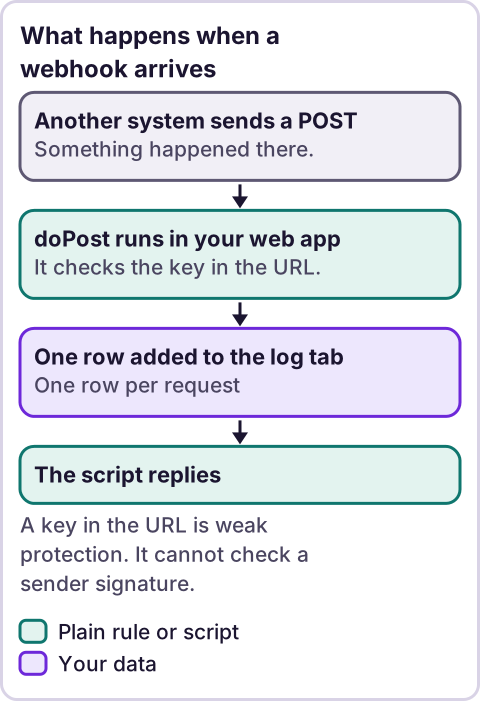
Diagram: What happens when a webhook arrives.
What does doPost do?
Google's web apps page says: "When a program sends the app an HTTP POST request, Apps Script runs doPost instead." A script qualifies as a web app only if it "contains a doGet or doPost function." My tool returned that page in full, but check the quotes on the page.
The function gets one argument, usually named e. The page describes two parts of it. e.parameter is "An object of key/value pairs that correspond to the request parameters." e.postData.contents is "The content text of the POST body." The page also reserves two parameter names, c and sid: "The following parameter names are reserved by the system and shouldn't be used in URL parameters or POST bodies:".
The function must return something. Google's content guide shows ContentService.createTextOutput('Hello, world!') as a way to return text from a web app. I could not read the ContentService reference page, because my fetch tool declined it. I used the guide only.
How do you deploy it as a web app?
Google's page says: "At the top right of the script project, click Deploy > New deployment." Then: "Next to "Select type," click Enable deployment types settings > Web app." Then: "Enter the information about your web app in the fields under "Deployment configuration.""
The page's permissions section uses the phrases "Execute the app as me" and "Execute the app as user accessing the web app." I could not confirm the name of the field that sets who may call the app, so I give no click path for it. Read the form as it appears. A sender such as another company's server is not signed in to your Google account, so work out with Google's own help what access setting lets it reach the URL. I did not test this.
What does the script look like?
Paste this into the Apps Script project attached to the sheet. Make a tab named Webhook log. Set SECRET to a long random string that you make up. Change FIELDS to the fields your sender posts as JSON.
// Receives a JSON webhook and adds one row per request to a "Webhook log" tab. Deploy it as a web app.
var SECRET = '';             // Paste a long random string. Senders must add ?key=THE_STRING to the URL. Your decision.
var LOG_TAB = 'Webhook log';
var FIELDS = ['id', 'email', 'total']; // The JSON fields to keep, in column order. Change to match what your sender posts.
var MAX_CHARS = 2000;        // Longest raw body to store.

function safe(v) {
  return typeof v === 'string' && /^[=+\-@]/.test(v) ? ' ' + v : v;
}

function reply(text) {
  return ContentService.createTextOutput(text);
}

function pick(body) {
  var data;
  try {
    data = JSON.parse(body);
  } catch (err) {
    return null;
  }
  if (data === null || typeof data !== 'object' || Array.isArray(data)) return null;
  return FIELDS.map(function (f) {
    var v = data[f];
    if (v === undefined || v === null) return '';
    return safe(typeof v === 'object' ? JSON.stringify(v) : v);
  });
}

function handle(e) {
  if (!SECRET) return 'refused: no secret set';
  if (!e || !e.parameter || e.parameter.key !== SECRET) return 'refused: wrong key';
  var body = e.postData && e.postData.contents ? String(e.postData.contents) : '';
  if (body === '') return 'refused: empty body';
  var tab = SpreadsheetApp.getActiveSpreadsheet().getSheetByName(LOG_TAB);
  if (!tab) return 'error: missing tab';
  var fields = pick(body);
  var stamp = Utilities.formatDate(new Date(), Session.getScriptTimeZone(), 'yyyy-MM-dd HH:mm:ss');
  if (fields === null) {
    tab.appendRow([stamp, 'unreadable'].concat(FIELDS.map(function () { return ''; }), [safe(body.slice(0, MAX_CHARS))]));
    return 'saved: unreadable';
  }
  tab.appendRow([stamp, 'ok'].concat(fields, [safe(body.slice(0, MAX_CHARS))]));
  return 'saved: ok';
}

function doPost(e) {
  return reply(handle(e));
}
What the parts do, with Google's own descriptions as I read them in the method tables this session:
getActiveSpreadsheet(): "Returns the currently active spreadsheet, ornullif there is none."getSheetByName(name): "Returns a sheet with the given name."appendRow(rowContents): "Appends a row to the bottom of the current data region in the sheet."Utilities.formatDate"Formats date according to specification described in Java SE SimpleDateFormat class."Session.getScriptTimeZone()"Gets the time zone of the script."JSON.parseis plain JavaScript, not a Google method. I did not look it up in Google's docs.
The script refuses every request while SECRET is blank. It compares e.parameter.key with SECRET. It refuses an empty body. It reads the body as JSON and keeps the fields in FIELDS. If the body is not a JSON object, it saves the raw text and marks the row "unreadable." It stores the first 2,000 characters of the raw body in the last column. It adds rows with appendRow and never edits a cell. If a value starts with =, +, - or @, it adds a leading space, so the sheet does not treat it as a formula. The sender adds ?key= and your secret to the web app URL.
Why is a key in the URL weak protection?
Anyone who sees the URL can post to it. URLs can show up in logs and in tools that store them. Treat the key as a lock on a screen door. It stops accidents and casual guesses, not a determined person. Do not log anything you cannot afford to leak, and rotate the key if it spreads. Change SECRET and redeploy. I did not confirm how redeploying changes the URL, so check after you deploy.
Can the script check a sender's signature?
Some senders add a signed header to prove a request is real. My tool found nothing about request headers on Google's web apps page. So I could not confirm that a script can read headers, and this script does not check a signature. For a sender that depends on signed headers, I do not recommend this route yet. I also could not confirm how Google handles redirects for a sender, so test with your own sender before you rely on it.
How do you test it?
- Set
SECRET. Deploy as a web app, following Google's steps above. - Send a test POST from a tool you trust, with a small JSON body of fake data and
?key=plus your secret on the URL. - Check that
Webhook loghas one new row with "ok." - Send the same request with the wrong key. Check that no row is added.
- Send a body that is not JSON. Check that the row says "unreadable."
- Delete the test rows. Rotate the secret if you shared it.
What did the test show?
I tested the script in Node with a mock of the web app and the sheet. All 21 checks passed. They covered a good request, the stored fields, the raw body, a wrong and a missing key, a blank secret, an empty body, text that is not JSON, an array, missing fields, nested values and zero, the body length cap, a missing tab, a missing event, other field lists, a JSON null, the formula guard and an entry point named doPost only. The mock cannot show how Google routes a real request. Nothing was run in Google.
Where does an LLM fit in this?
An LLM can help with the messy input. For example, it can read a sender's sample payload and suggest which fields to keep in FIELDS, or summarize a week of "unreadable" rows. A person checks the suggestion against the sender's own documentation, because an LLM can invent a field and sound sure. Do not paste real customer payloads into an LLM tool unless your own rules allow it. The key check, the parse and the log are plain rules. My stance: AI writes the code, plain automation runs it, and an LLM shows up only where the input is messy and a person checks the result. For background on the tool, see what Google Apps Script is.
Where this has limits
- Nothing was run in Google. The test was a mock in Node.
- A key in the URL is weak. Anyone with the URL can post.
- No signature check. I could not confirm that a script can read request headers.
- I could not confirm the access setting a sender needs, or how redirects behave. Test with your own sender.
- I could not read Google's ContentService reference page. My fetch tool declined it. I used the content guide.
- I did not test several requests at once. I could not confirm how
appendRowbehaves when requests overlap. - The body is stored as text. Never run it, and keep the sheet private.
- No ReRev prices and no promises about results.
If you want help receiving data from other systems without exposing your sheet, see our AI operations service or tell us what sends data. Do not send API keys, secrets, passwords or login details.
Frequently asked questions
Can Google Apps Script receive a webhook?
Yes. Google's page says a POST request to a deployed web app runs doPost.
Is the shared key in the URL secure?
It is weak. Anyone who sees the URL can post to it. Use it for low-risk data only.
Can the script verify a signature header?
I could not confirm that a script can read request headers, so this one does not.
Where does the data go?
Each request adds one row to the Webhook log tab.
What if the sender posts something that is not JSON?
The script saves the raw text and marks the row "unreadable."
Does the script use an LLM?
No. An LLM can help choose fields, and a person checks the result.
Read next: Send Lovable form submissions to Google Sheets and send Shopify orders to Google Sheets are two real senders you can point at this webhook.