Blog / Small Business Automation
Build vs. Buy Automation: How to Decide for One Workflow
By Keyona Meeks, Founder, ReRev Labs · Oct 31, 2026 · 8 min read
The short answer: Decide one workflow at a time. Buy when a product already does the job and your process is standard. Build when your process is your own, the tools you already pay for can run it, and a named person will own it afterward. Wait when the process is still changing. Three questions settle most cases: Is the process standard? Does the input stay the same? Who fixes it when it breaks?
By the end of this post, you'll be able to:
- Sort one workflow into buy, build, hire or wait, using five questions.
- Compare the real 12-month cost of each option with a worksheet you fill in yourself.
- Run a one-week test before you commit money to either side.
You have a workflow that eats time. Maybe it is chasing answers by email, retyping orders into a sheet, or sending the same reminder by hand every Friday. Someone says "just buy a tool for that." Someone else says "we could build it." Both are right some of the time.
Most of what ranks for this question is written by a firm that sells one side of the choice. A software vendor says buy. A custom-build shop says build. I sell build work, so you should know which way I lean. This post is built so you can reach the answer without me. At the end, I say when I would tell you to buy.
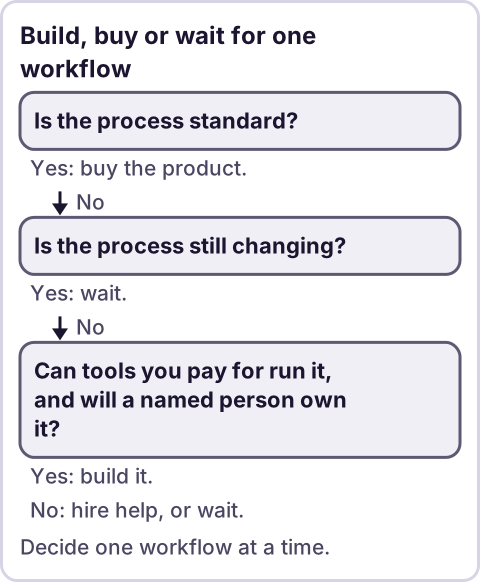
Diagram: Build, buy or wait for one workflow.
What are you actually deciding?
You are not deciding "build or buy" for your whole company. You are deciding for one workflow. A workflow has a trigger, a set of steps, a person who owns it and an output. For example:
- Trigger: A subcontractor emails a question.
- Steps: Log it, assign it, set a due date, remind the owner, send the answer back.
- Owner: The project manager.
- Output: A closed item in a log.
Write yours in those four lines before you read on. If you cannot fill in all four, you have found your first problem. A workflow you cannot describe cannot be bought or built well.
When should you buy?
Buy when most of these are true:
- The process is standard. Many other businesses do it the same way. Invoicing, payroll and scheduling are examples.
- A product already does it. You can name two products, and a trial shows they handle your real case, not their demo.
- You can export your data. If you leave, your records come with you.
- Nobody on your side wants to own a custom system. Buying moves the upkeep to the vendor.
- The workflow is not where you win. It is a cost of doing business, not a reason customers pick you.
Buying also makes sense when the workflow touches regulated data. If it does, check with your compliance or legal contact before you decide where the data lives. A vendor with a security review can be the safer path.
When should you build?
Build when most of these are true:
- Your process is your own. The product that fits "mostly" forces you to change how you work, or you end up with a spreadsheet beside it.
- The pieces already exist. Google Workspace, your site host and your email can often run the workflow. The free tiers of tools you already use are the first place to look.
- The input is predictable enough for rules. A form field, a label, a row in a sheet. Plain rules handle that well.
- Someone owns it after launch. One named person, with a way to know when it fails.
- You can describe done. "A reminder goes to the owner two days before the due date" is a clear target.
My stance on the build itself: AI writes the code, plain automation runs it, and an LLM shows up only where the input is messy and a person checks the result. AI tools make a first version of a script much faster to write. They do not make it free to own. The cost of a build is mostly in the owning: who watches it, who fixes it and who remembers how it works. Plan for that part first.
When should you hire someone, or wait?
Two more options belong on the table.
Hire a person when the workflow depends on judgment, accountability or relationships. Automation can prepare the work. A person should still make the call. If the answer to "who decides?" is "a human, every time," do not build around removing that human.
Wait when the process is still changing. If you changed the steps three times this quarter, you are still designing the workflow. Automating it now means rebuilding it next month. Do it by hand with a checklist until the steps hold still for a while.
Do not automate a workflow that happens a few times a year. The setup time will not come back.
How do you compare the real cost?
Do not compare a subscription price to a build quote. Compare 12 months of total cost for each option. Fill this in with your own numbers.
| Cost line | Buy | Build |
|---|---|---|
| Money out the door | Subscription, extra seats, add-ons you will need | Build fee or your own build time, tool accounts |
| Setup time | Training, data import, mapping your process to theirs | Defining the workflow, testing, fixing |
| Ongoing upkeep | Usually the vendor's job, plus your admin time | Your job or your builder's: alerts, fixes, changes |
| When your process changes | Pay for a higher plan or work around the limit | Edit the script or rule |
| If it breaks | Vendor support queue | Whoever owns it, so name them now |
| Exit | Can you export your records, and in what format? | You own the code and the data, if you set it up that way |
Two rules for the worksheet. First, count your own time at a real value, even if you are the one doing it. Second, add a row for the cost of doing nothing. If the workflow costs you three hours a week and you value those hours, that number belongs in the table too. I will not give you a figure for it. Your hours and your rate are yours.
For more on what a build costs, read how much small business automation costs. If you want to see which paid tools you could replace, read how to replace paid software subscriptions.
What does a one-week test look like?
Spend a week before you spend money. This works for either side.
- Write the workflow in four lines. Trigger, steps, owner, output.
- Do it by hand with a log. Use a sheet with one row per item. Note the date, who touched it and how long it took.
- Count the exceptions. Mark every item that did not follow the normal steps.
- Try the cheapest version. One shared sheet and one reminder rule, or one product trial with your real data. Not the demo data.
- Decide with the log in front of you. If exceptions are rare and steps are stable, a rule or a product can handle it. If every item is an exception, the workflow is not ready for either one.
The exceptions count is the part most people skip. It tells you whether a standard product will fit or whether you need something shaped around you.
Where this has limits
- This is a framework, not a quote. It cannot tell you what your build or your subscription will cost. Only your numbers can.
- Regulated data changes the question. Health, payment and government ID data carry rules. Check with a professional before you choose where it is stored.
- I sell build work. I lean toward building when the process is yours and the pieces exist. I would tell you to buy when the process is standard and a product handles it.
- Some workflows are not worth either. If it happens rarely or the steps keep changing, a checklist beats both.
- A build needs an owner. If nobody on your side will own it and nobody will be paid to, buy.
If your workflow passes the build questions and you want help, you can apply on /letstalk. Bring the four-line workflow, your exception count from the one-week test, and the product you were considering buying.
Frequently asked questions
We already have project software. Do we still need to build anything?
Maybe not. If your software handles the workflow with your real data, use it. Build only for the part it cannot do, such as a reminder it does not send or a report it cannot produce. Many teams keep the software and add one small automation beside it.
I don't have time to set this up. Which option is faster?
Buying is usually faster to start. Building takes more of your time at the start and less afterward, if the workflow is stable. If you have no time for either, hire someone to do the setup and name who owns it afterward.
What happens when the person who built it leaves?
This is the main risk of building. Reduce it before you start: keep the code in an account the business owns, write a one-page handover note, and set an alert that tells a named person when it fails.
Is it cheaper to build now that AI can write code?
AI makes the first draft faster. It does not remove testing, upkeep or ownership. Count those costs in your worksheet before you assume a build is cheap.
Should I use an AI agent for this?
Only for the step where the input is messy and a person can check the result, such as reading a free-text message into fields. Steps with clear rules should run as plain automation. The rules are cheaper to run and easier to trust.
Read next: When to hire someone to automate a workflow if the decision is really whether to get outside help, and fractional chief of staff vs. operations manager if the gap is a person who owns the process. For the platform version of this choice, Zapier vs. a custom script prices both over a year.