Blog / Small Business Automation
Zapier vs. a Custom Script: What Each Costs After a Year
By Keyona Meeks, Founder, ReRev Labs · Oct 31, 2026 · 8 min read
The short answer: Compare the two over twelve months, not on the monthly price. For each option, add the subscription or build cost, the setup time, the yearly upkeep hours and the cost of the work stopping. A subscription is cheap to start and grows with usage. A custom script costs more up front and costs little to run, but someone has to own it. I could not read Zapier's pricing page in this session, so this post has no Zapier prices. Use the worksheet below with the current numbers from the page. We sell build work, so weigh this with that in mind. Neither option wins in general.
By the end of this post, you'll be able to:
- Lay out a twelve-month cost comparison for one workflow.
- Name the costs each side tends to leave out.
- Decide which questions matter more than price.
- Fill in the worksheet with your own numbers.
We sell build work, and I want that said up front. We also use both kinds of tools. This post is a way to do the math, not an argument that one side is right.
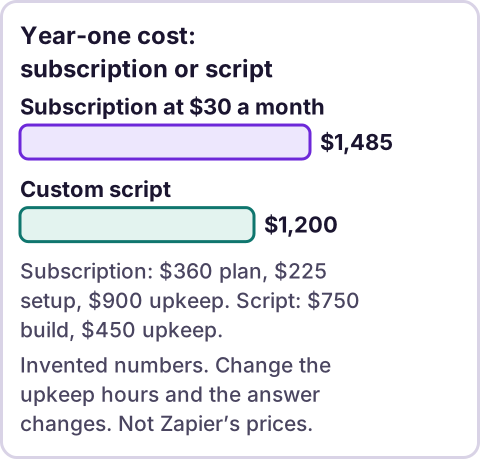
Diagram: Year-one cost: subscription or script.
What am I comparing?
Zapier is a paid service that connects apps through workflows you set up in its editor. A custom script, in this post, is code written in Google Apps Script that runs inside your Google account. If you want a plain explanation of the second one, see what Google Apps Script is.
They overlap on simple jobs, such as "when a form is submitted, add a row and send an email." They differ in who owns the work, what it costs to run and what happens when something changes.
Why did I not quote Zapier's prices?
I tried to read Zapier's pricing page and the tool I use for reading web pages declined the address. I did not find another way to read it that I was willing to use, so I have nothing from that page to quote. Third-party sites publish Zapier prices, but they go stale, and I would be repeating them without checking.
So the numbers in the example below are invented round numbers. Replace them. Open the pricing page yourself, write down the plan you would need, the monthly price, the limit on tasks, and the date you looked. A price with no date is not worth much.
What goes in a year-one worksheet?
For each option, fill in these lines for twelve months:
- Plan or build cost. For a subscription, twelve times the monthly price at the plan you would need. For a script, what you pay a builder or the hours you spend.
- Setup time. Hours to build the workflow, test it and train a person. Value the hours at what that person's time costs.
- Upkeep time. Hours a month to fix, update and check. Apps change. Passwords expire. Fields get renamed.
- Usage growth. Does the volume grow? Subscriptions often step up by usage. A script does not charge per run, though it has limits.
- Cost of it stopping. If the workflow fails for a day, what does that cost?
- Exit cost. If you leave, what do you have? A script is yours. A workflow in a service is rebuilt by hand.
What does an example look like?
This example uses invented numbers. It is not Zapier's price and it is not ours.
Say a person's time is worth $75 an hour. Say a subscription plan costs $30 a month.
- Subscription: $30 × 12 = $360. Setup of 3 hours = $225. Upkeep of 1 hour a month = 12 hours = $900. Year-one total: $1,485.
- Script: Build of 10 hours = $750. Upkeep of half an hour a month = 6 hours = $450. Year-one total: $1,200.
I checked that arithmetic with a calculator script. The point is not that the script is cheaper. Change the upkeep to 2 hours a month on the script and it costs more. Change the plan to $10 a month and the subscription wins. The worksheet tells you which of your assumptions the answer depends on.
Most of the cost in this example is time, not the subscription. People compare the monthly price and forget the hours.
What do subscriptions leave out?
- Limits that change the plan you need. Check the task or run limits and what counts toward them.
- Price changes. The price you pay in month thirteen may not be the price in month one.
- Another account to manage. Someone has to own the login.
- Steps that are hard to express. Some logic fits badly in a visual editor.
What do scripts leave out?
- An owner. Someone has to understand the code. Our post on what Google Apps Script is covers the basics, and a script nobody can read is a risk.
- Limits. Google's quotas page lists "Script runtime | 6 min / execution," per an earlier review, and email recipient limits of 100 a day for consumer accounts and 1,500 a day for Workspace accounts. It also says "All quotas are subject to elimination, reduction, or change at any time, without notice." Check the live page.
- Whose account it runs in. Installable triggers "always run under the account of the person who created them," per an earlier review. If that person leaves, the script can stop.
- Testing. A script is only as good as the tests someone ran. Mine are usually mock tests, not runs in your account, and I say so.
How do you decide, besides price?
Ask these. They are my questions, not a validated test.
- How many people need to change it? If non-technical people edit the workflow weekly, a visual editor helps.
- How strange is the logic? Unusual rules fit better in code.
- Is the data sensitive? Where the data goes matters. Read the terms of any service that sees it.
- Who is the owner in a year? Name the person.
- How bad is a failure? The worse it is, the more you should pay for monitoring either way.
For other subscriptions you might replace, see replace paid software subscriptions. For a wider view of what automation costs, see how much small business automation costs. To pick the first workflow to price, start with what to automate first.
Where does an LLM fit in this?
An LLM can help with the messy part: reading a description of your current process and listing the steps, or reading a vendor's plan page you pasted in and listing the limits it states. A person should check any number it extracts against the page. The cost worksheet is plain arithmetic. My stance: AI writes the code, plain automation runs it, and an LLM shows up only where the input is messy and a person checks the result. That stance applies whichever tool you choose.
Where this has limits
- I could not read Zapier's pricing page. This post contains no Zapier prices or plan names.
- The example numbers are invented. They show the method only.
- The Google quota lines are from an earlier review. Check the live page.
- I have no data on which option costs less for most businesses.
- We sell build work. I tried to keep this fair. Read it with that in mind.
- No ReRev prices and no promises about savings.
If you want a second pair of eyes on your numbers, tell us the workflow and what it costs you today. Do not send passwords or login details.
Frequently asked questions
Is Zapier or Google Apps Script cheaper?
It depends on volume, upkeep and who builds it. Compare the full twelve months, not the monthly price.
What does Zapier cost?
Check Zapier's pricing page and write down the date you looked. I could not read it for this post.
What does a custom script cost?
A build cost plus upkeep. Both depend on the job and on whose time you count.
Does a script have limits?
Yes. Google publishes quotas for Apps Script, and they can change.
What happens if the person who built the script leaves?
Triggers run under the account that created them, so the script can stop. Plan the handover before you need it.
Can I move from one to the other later?
Yes, but you rebuild the workflow. Keep a plain-language description of what it does.
Read next: Build vs. buy automation is the bigger version of this same question.