Blog / Technical Guides
Host a Lovable Site on Cloudflare Pages with Your Own Domain
By Keyona Meeks, Founder, ReRev Labs · Oct 31, 2026 · 8 min read
The short answer: To host a Lovable site on Cloudflare Pages you need your code in a Git repository, a build setting that matches your project, and your domain pointed at the new host. Cloudflare's own documentation now says "Start new projects with Workers," so check which product it points you to today. I could not read Cloudflare's custom domain steps, its single-page-app rules or Lovable's documentation, and I have not deployed a Lovable site to Cloudflare. So this is a pre-flight checklist and a test plan, not a click-by-click guide. We sell build work, so weigh this with that in mind.
By the end of this post, you'll be able to:
- Know what you need before you start.
- Read Cloudflare's build fields against your own project.
- Test the three things that break after a move.
- Avoid losing email or links while you switch.
I sell build work. For the other routes, see our post on deploying a Lovable website to your own domain, which describes Lovable's built-in option, a GitHub and Netlify route and your own hosting. For the basics of how a domain points at a host, see the DNS crash course for founders and clients.
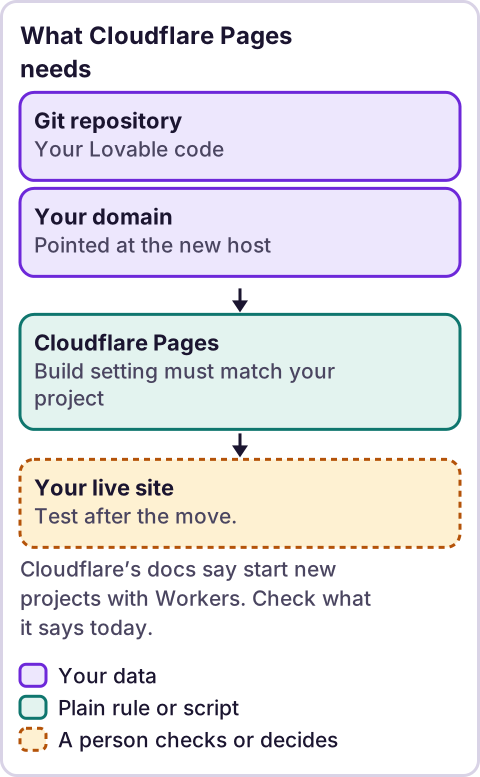
Diagram: What Cloudflare Pages needs.
What did Cloudflare's documentation say?
I read Cloudflare's Pages documentation through a tool that summarizes, on October 31, 2026. Three things came back usable.
First, a notice on the Pages overview: "Workers supports most Pages use cases and offers a broader feature set." It continues: "It is Cloudflare's primary platform for building applications. Start new projects with Workers." The getting-started page repeats "Start new projects with Workers." So Pages is documented, but Cloudflare points new projects elsewhere. Read the live notice before you choose. I did not read the Workers side.
Second, the Git integration page. As the tool summarized it, the steps are: go to the Workers and Pages page in the dashboard, choose Create application, then Pages, then Connect to Git, pick GitHub or GitLab, pick a repository and start setup. The tool gave me one direct quote: "you will need to specify the site's build command and build output directory to tell Cloudflare Pages how to deploy your site." It also reported that if no build step is needed, you leave the build command blank. These are summaries, not verbatim page text apart from that quote. Check the live page for current menu names.
Third, a note that for a project with a custom domain you "must first delete the CNAME record associated with your Pages project" before deleting the project.
What I could not confirm: the custom domain steps, whether the domain needs to use Cloudflare's nameservers, and how Pages treats an address your site did not build as a file, which is the single-page-app question below. Those pages were declined or did not contain it.
What do you need before you start?
- Your code in a Git repository. Our deploy post describes a GitHub route. I could not read Lovable's documentation, so I cannot tell you how its GitHub connection works. Ask Lovable.
- Your build settings. In our own repo, which is a Vite project, the build script is
vite buildand a follow-up script writes the finished site into a folder calleddist. Yours may differ. Openpackage.jsonand read thebuildscript, then find where the finished files land. - Access to your domain. You need to be able to change its DNS records. Know who controls them.
- A list of what the domain does today. Websites, email, other services. Moving a domain can break email if records are lost.
- A rollback plan. Keep the old host running until the new one passes your tests.
What breaks after a move?
These are the three checks I would run first. They are my list, not Cloudflare's.
- Deep links. In a single-page app, there is one real HTML file and the browser draws each page. If you open an address like
/aboutdirectly, or refresh on it, the host has to send the app and not an error. I could not confirm how Cloudflare Pages handles this. Test it: open an inner page directly and press refresh. If you get a "not found" page, you need a fallback rule. Look up Cloudflare's current answer. - Page titles and previews. A move can change what crawlers see. Fetch a page with curl and read the title and the sharing tags. See our post on making your Lovable website AI-crawler friendly.
- Forms and embeds. Anything that posts to another service, or loads over plain
http, can break. Submit every form once.
Add two more: HTTPS on every address you use, and email, by sending and receiving a test message after the DNS change.
How do you point the domain?
I could not read Cloudflare's steps, so I will not give them. The general idea, which you can check against the DNS guide linked above, is that the domain's records are changed to point at the new host, and some hosts also ask you to move the domain's nameservers. Whether Cloudflare Pages requires that, I could not confirm.
Before you touch anything, write down every existing record. Take screenshots. Change one thing at a time and test after each.
Is this free, or cheaper?
I do not know. I did not read Cloudflare's pricing, and I make no cost claim. Check the current plans against what you pay now.
Should you move at all?
Possibly not. If your site works where it is, a move is risk without a reward. Reasons to move: you want one provider for domain and hosting, you want a specific feature, or your current host is a problem. Reasons to stay: it works, and nobody has time to test.
Where does an LLM fit in this?
An LLM can help with the messy part: reading your DNS records export and listing what each record is for, or comparing two hosts' documentation you paste in. A person should check the list against the live records before anything is changed, because deleting the wrong record can take email down. The checklist and the tests are plain steps. My stance: AI writes the code, plain automation runs it, and an LLM shows up only where the input is messy and a person checks the result.
Where this has limits
- I have not deployed a Lovable site to Cloudflare Pages. This is a checklist, not a tested walkthrough.
- I could not read Cloudflare's custom domain steps, its single-page-app handling or Lovable's documentation.
- The Git integration steps are a tool's summary. Only one sentence is a direct quote. Check the live page.
- Cloudflare says to start new projects with Workers. I did not read about Workers.
- I make no cost claim.
- Our build facts come from our own repo, which is one project. Yours may differ.
- We sell build work. Read this with that in mind.
- No ReRev prices and no promises about results.
If you want help moving a site, or want to claim a free rebuild of a tool you pay for, tell us what you use. Do not send passwords or login details.
Frequently asked questions
Can I host a Lovable site on Cloudflare Pages?
I have not done it, and I could not read the full steps. Cloudflare documents Pages, and it also says to start new projects with Workers.
What build settings does a Lovable site need?
Read your project's package.json. Our Vite project builds with vite build and writes to dist. Yours may differ.
Will my inner pages work after I move?
Test it. Open an inner page directly and refresh. I could not confirm how Pages handles this.
Will I lose my email?
Not if you keep your existing records. Write them all down before you change anything, and test email afterward.
Do I have to move my nameservers?
I could not confirm that for Pages. Check Cloudflare's current instructions.
Is it cheaper?
I do not know. Compare current plans against what you pay today.
Read next: Deploy a Lovable site to Vercel with your own domain if Vercel is your host instead.