Blog / Construction Operations
Certificate of Insurance Tracking: Expiry Reminders from a Google Sheet
By Keyona Meeks, Founder, ReRev Labs · Oct 31, 2026 · 9 min read
The short answer: Keep one row per policy, not one row per subcontractor. Record who, which project, the policy type and the expiration date. Then use a short Apps Script to email the project manager and the subcontractor when a certificate is 30 days, 14 days and 0 days from expiring. This tracks dates. It does not tell you whether a certificate meets your contract. For that, ask your insurer, broker or attorney.
By the end of this post, you'll be able to:
- Set up a certificate of insurance tracker in Google Sheets with the columns that matter.
- Color expired and expiring certificates so you see them at a glance.
- Get reminder emails at 30, 14 and 0 days before a certificate expires.
It is Monday. A subcontractor's crew is on site. Someone asks if their general liability certificate is current. You open a folder of PDFs. You find one. It expired in August.
Nobody forgot on purpose. The dates live inside files, and files do not remind anyone. This post moves the dates into a sheet and adds the reminder.
I want to be plain about what this is. It is a date tracker. I am not an insurance professional or an attorney. Whether a certificate is enough for your contract is not something a spreadsheet can tell you.
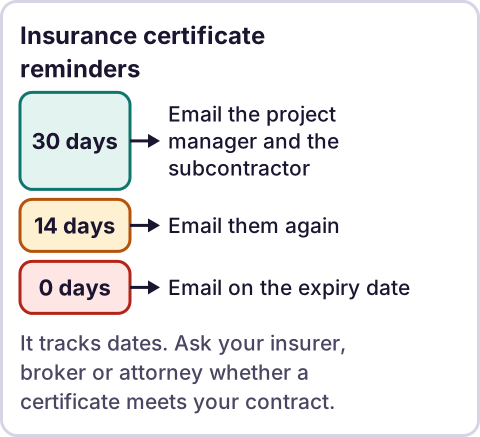
Diagram: Insurance certificate reminders.
What is a certificate of insurance, and what does it not do?
A certificate of insurance, or COI, is a summary of someone's policies. It lists the insurer, the type of coverage, the limits and the dates.
ACORD publishes the standard forms. Its FAQ says a certificate is not an insurance policy. It says a certificate does not change coverage, and that only an endorsement, rider or amendment to the policy can. It also says that naming a contract on a certificate does not provide coverage. Source: ACORD Certificates of Insurance FAQ, checked October 30, 2026.
That matters for a tracker. A green cell in your sheet means a date has not passed. It does not mean you are covered. Your contract, your insurer, your broker or your attorney decides what you require and whether a certificate meets it.
What columns does a COI tracker need?
Make a tab called COI Tracker. Use one row per policy. A subcontractor with general liability, workers' compensation and auto has three rows. The script reads headers by name, so spell them exactly.
| Column | Header | What goes in it |
|---|---|---|
| A | Subcontractor | Company name |
| B | Subcontractor email | Who sends you the new certificate |
| C | Project | Job name or number |
| D | PM email | The project manager who gets the reminder |
| E | Policy type | General liability, workers' compensation, auto, umbrella, or what your contract lists |
| F | Insurer | As shown on the certificate |
| G | Expiration date | Type the date from the certificate |
| H | Status | A dropdown: Current, Requested, Replaced, Inactive |
| I | Last reminder stage | The script writes this. Leave it empty. |
| J | Days left | A formula. See below. |
| K | Link to certificate | A link to the file in Drive |
| L | Notes | What your contract asks for, or what to check |
Days left. In J2:
=IF(G2="","",G2-TODAY())Status dropdown. Select H2:H1000. Choose Data → Data validation → Add rule. Under Criteria, choose Dropdown and enter the four statuses. See Google's help for dropdown lists, checked October 30, 2026.
Color rules. Select A2:L1000. Choose Format → Conditional formatting. Under Format cells if, choose Custom formula is. Add two rules.
Expired, in red:
=AND($H2<>"Replaced",$H2<>"Inactive",$G2<>"",$G2<TODAY())Expiring within 30 days, in yellow:
=AND($H2<>"Replaced",$H2<>"Inactive",$G2<>"",$G2>=TODAY(),$G2-TODAY()<=30)See Google's help for conditional formatting, checked October 30, 2026.
How do you get reminders at 30, 14 and 0 days?
Open the sheet. Choose Extensions → Apps Script. Delete the sample code. Paste the script below. Change PM_EMAIL_DEFAULT to your email. Save.
If you have never used Apps Script, read what Google Apps Script is first.
// COI expiry reminders. Paste into Extensions > Apps Script.
const CONFIG = {
  SHEET: 'COI Tracker',
  STAGES: [30, 14, 0],          // remind when this many days or fewer remain
  PM_EMAIL_DEFAULT: 'you@yourcompany.com',  // used when the PM email cell is empty
  EMAIL_PM: true,               // true = email the project manager. Set false when you stop overseeing
  EMAIL_SUBCONTRACTOR: true     // true = also email the subcontractor
};

function sendCoiReminders() {
  const sheet = SpreadsheetApp.getActive().getSheetByName(CONFIG.SHEET);
  const data = sheet.getDataRange().getValues();
  const col = headerMap_(data[0]);
  const today = startOfDay_(new Date());
  const toSend = [];

  for (let r = 1; r < data.length; r++) {
    const row = data[r];
    if (row[col['Status']] === 'Replaced' || row[col['Status']] === 'Inactive') continue;
    const exp = row[col['Expiration date']];
    if (!(exp instanceof Date)) continue;
    const daysLeft = Math.round((startOfDay_(exp) - today) / 86400000);
    const stage = stageFor_(daysLeft);
    if (stage === null) continue;
    if (String(row[col['Last reminder stage']]) === String(stage)) continue;
    toSend.push({
      sheetRow: r + 1,
      stage: stage,
      sub: row[col['Subcontractor']],
      project: row[col['Project']],
      policy: row[col['Policy type']],
      daysLeft: daysLeft,
      expires: Utilities.formatDate(exp, Session.getScriptTimeZone(), 'yyyy-MM-dd'),
      subEmail: String(row[col['Subcontractor email']]).trim(),
      pmEmail: String(row[col['PM email']]).trim() || CONFIG.PM_EMAIL_DEFAULT
    });
  }

  toSend.forEach(function (d) {
    const when = d.daysLeft < 0 ? 'expired ' + Math.abs(d.daysLeft) + ' day(s) ago'
      : d.daysLeft === 0 ? 'expires today'
      : 'expires in ' + d.daysLeft + ' day(s)';
    const line = d.sub + ' | ' + d.policy + ' | ' + d.project + ' | ' + when +
      ' (' + d.expires + ')';
    if (CONFIG.EMAIL_PM) {
      MailApp.sendEmail({
        to: d.pmEmail,
        subject: 'COI ' + when + ': ' + d.sub,
        body: line + '\n\nAsk the subcontractor for a new certificate.'
      });
    }
    if (CONFIG.EMAIL_SUBCONTRACTOR && d.subEmail) {
      MailApp.sendEmail({
        to: d.subEmail,
        subject: 'Your ' + d.policy + ' certificate ' + when,
        body: 'Our records show your ' + d.policy + ' certificate ' + when + ' (' +
          d.expires + '). Please send your updated certificate.'
      });
    }
    sheet.getRange(d.sheetRow, col['Last reminder stage'] + 1).setValue(d.stage);
  });
}

// 30 -> within 30 days, 14 -> within 14 days, 0 -> expires today or has expired.
function stageFor_(daysLeft) {
  if (daysLeft <= CONFIG.STAGES[2]) return CONFIG.STAGES[2];
  if (daysLeft <= CONFIG.STAGES[1]) return CONFIG.STAGES[1];
  if (daysLeft <= CONFIG.STAGES[0]) return CONFIG.STAGES[0];
  return null;
}

function setupCoiTrigger() {
  ScriptApp.getProjectTriggers().forEach(function (t) { ScriptApp.deleteTrigger(t); });
  ScriptApp.newTrigger('sendCoiReminders').timeBased().everyDays(1).atHour(7).create();
}

function headerMap_(headers) {
  const map = {};
  headers.forEach(function (h, i) { map[String(h).trim()] = i; });
  return map;
}

function startOfDay_(d) {
  return new Date(d.getFullYear(), d.getMonth(), d.getDate());
}
Run setupCoiTrigger once. Google will ask you to authorize the script, because it reads your sheet and sends email as you. Approve it only if you wrote or checked the code. Then open Triggers in the left menu and check that one daily trigger exists.
Here is how it behaves.
- It skips rows with the status
ReplacedorInactive. - It sends its emails the first time a policy comes within 30 days, again within 14 days, and again at 0 days or after expiry.
- It writes the stage in
Last reminder stage, so the same stage is not sent again every day. - By default it emails both the project manager and the subcontractor, when the row has a subcontractor email. Read the wording in the script first, because the message goes out under your name. To stop the project manager copy, set
EMAIL_PM: false. To send to the project manager only, setEMAIL_SUBCONTRACTOR: false.
When a new certificate arrives, do not type a new date over the old one. Set the old row to Replaced and add a new row. If you type over the date, the old stage stays in Last reminder stage, and the script may skip the next reminder for the new date.
Google runs an atHour trigger anywhere inside that hour, in the script's time zone. Check the time zone in Project settings. Source: ClockTriggerBuilder reference, checked October 30, 2026.
Who should get the reminder?
Both, by default. The project manager gets the alert, because that person is on the job, can ask the subcontractor and can hold the crew if your policy says so. The subcontractor gets a short request for a new certificate. Agree on the wording with your team before you turn it on, because a reminder that arrives from your account, with the wrong tone or an old date, costs you goodwill. When you are ready to stop overseeing each reminder, set EMAIL_PM: false in the script. The subcontractor reminders then continue without you. That is your choice, and you can set it back at any time.
Where does an LLM fit in COI tracking?
Not in the reminders. A date and a rule are plain automation. An LLM could help with one messy step: reading a PDF certificate and suggesting the policy type, insurer and dates for a row. If you try that, a person should compare each suggested value with the certificate before it is saved. Do not rely on a model to decide whether a certificate meets a contract.
Where this has limits
- It tracks dates, not coverage. A current date does not mean the policy limits, additional insured wording or endorsements meet your contract. Check with your insurer, broker or attorney.
- Typing errors. The sheet only knows what you type. A wrong date gives a wrong reminder.
- Certificates can be wrong or out of date. The ACORD FAQ above explains what a certificate does and does not do. If it matters, ask your broker how to verify one.
- I tested the script with mock data only. It has not run in a live Google account. Test it on a copy of your sheet.
- Email quotas. Apps Script limits how many emails a script can send each day. See Google's quotas page, checked October 30, 2026.
- One owner. If the script fails, reminders stop. Check Executions in Apps Script now and then, and name one person who owns it.
- When to buy software instead. If you manage hundreds of subcontractors, need certificate checking against requirements, or need a portal where subcontractors upload their own documents, software built for compliance is the right size. A sheet fits a small team that chases dates.
If you want this tracker wired into how your office already works, with the reminders running without you, see our AI-powered operations work or apply on /letstalk. Bring a description of how you track paperwork today and where it slips. Do not send certificates, policy numbers or contracts.
For where to start with automation in general, read what to automate first in a small business.
Frequently asked questions
Do we already have compliance software? Why use a sheet?
Use your software if it sends the reminders you need. Some teams keep it and add a sheet for one gap, such as a simple reminder to the project manager. If your software already does that, you do not need this.
My team won't use another log. What do I do?
They do not have to. One person keeps the sheet, and the reminders come to the project manager by email. The field team does not need to open it. If they need to check status, share the sheet as view only.
I don't have time to set this up. How long does it take?
The sheet is a short job. Adding existing policies takes as long as you have policies. The script is a paste, one run and one test. If your contracts require more fields or checks, that is when to bring in help.
Can the script check that a certificate meets my contract?
No. It compares dates only. Ask your insurer, broker or attorney what your contract requires.
What if a subcontractor never sends a new certificate?
The sheet keeps showing it in red. The script sends its last email at 0 days, so it will not remind you again. What you do next, such as holding payment or stopping work, depends on your contract and your policy. Check with an attorney.
Is this insurance or legal advice?
No. It tracks and organizes dates. Insurance requirements and what a certificate proves depend on your contract, your insurer and your state. Check with an attorney, your insurer or a safety professional.
Read next: The subcontractor onboarding checklist collects the COI at the start so you are not chasing it later, and the paperwork map shows where certificates sit with the rest of the compliance paper.