Blog / AI & Automation
Where an LLM Actually Belongs in a Workflow: 5 Spots That Earn It
By Keyona Meeks, Founder, ReRev Labs · Oct 31, 2026 · 9 min read
The short answer: An LLM earns a place in a workflow at five kinds of step: reading messy text into fields, sorting items into a few buckets, drafting words a person approves, summarizing long text, and flagging items for a person to look at. At every one of them the input is messy and a person or a rule checks the output. Everything else stays a plain rule. This is the stance in practice: AI writes the code, plain automation runs it, and an LLM shows up only where the input is messy and a person checks the result.
By the end of this post, you'll be able to:
- Name the five kinds of step where an LLM earns its place.
- Give each one a check that catches a wrong answer.
- Use a three-question test to decide if a step needs an LLM at all.
- Mark the steps that should stay plain rules.
We sell AI and automation training for teams, so weigh this post with that in mind.
Our post on AI agents vs. automation names three places an LLM can sit. This post goes one step further. It gives five kinds of step, a concrete example for each, the check that goes with it, and the way each one fails. The examples are made up to show the shape of the step. They are not client results.
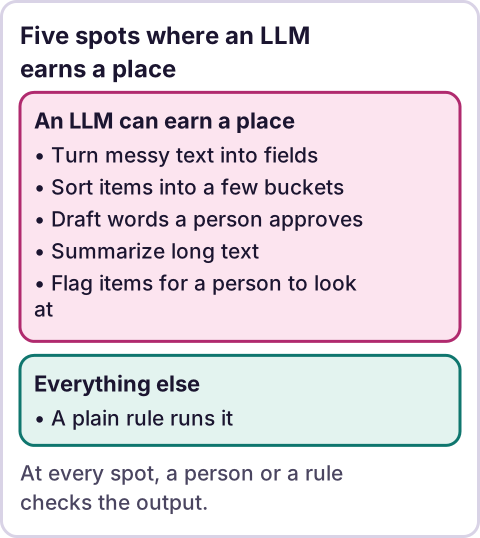
Diagram: Five spots where an LLM earns a place.
How do you decide if a step needs an LLM at all?
Ask three questions about the step.
- Is the input messy? Free text, a forwarded email, a photo of a form. If the input is already in neat columns, a rule can read it.
- Is there no clean rule to write? If you can say "if the subject contains X, do Y," write that rule. A rule costs nothing to run and does the same thing every time.
- Can a person or a rule check the result before it matters? If a wrong answer would go straight out to a client or move money, do not put an LLM there without a check.
If the answer to the first two is yes and the third is yes, the step is a candidate. If the first answer is no, use a rule. If the third answer is no, add the check first.
Spot 1: How can an LLM turn messy text into fields?
The step: A person types a request in their own words. You need the same facts in a fixed set of columns.
Example: An inquiry form has one big text box. An LLM reads "Hi, we run three dental offices and need help with scheduling reminders, hoping to start next month" and fills in: business type, number of locations, topic, timing.
The check: The script accepts only the fields you listed. A field with no answer stays blank. A person can see the original text next to the fields. For any field that has a fixed list of values, such as a timing choice, the script rejects a value not on the list.
How it fails: The model fills a blank with a guess. Tell it to leave a field empty when the text does not say, and check that blank fields stay blank.
Spot 2: How can an LLM sort items into buckets?
The step: Items arrive in many shapes and need one of a few labels.
Example: Emails to a shared inbox sorted into "quote request," "support question," "invoice" and "other."
The check: A fixed list of labels, including "other." Anything labeled "other," and anything the model is unsure of, goes to a person. A person samples the sorted items on a schedule you set and counts the misses.
How it fails: Items fit two labels, or none. A catch-all label and a human sample catch most of this. Do not let a label trigger something you cannot undo, such as an auto-reply to a client, until the sample shows the sort is reliable.
Spot 3: How can an LLM draft words for a person to approve?
The step: Someone has to write the first version of a message, and a person reviews it.
Example: A follow-up email after a meeting, saved as a draft in the owner's mail, not sent.
The check: The draft is a draft. A person reads it and presses send. The workflow has no send step of its own.
How it fails: The draft sounds right and states something untrue, such as a date or a promise. The person reads every fact before sending. Give the model the facts to use, and tell it to use only those.
Spot 4: How can an LLM summarize long text?
The step: A long thread, document or set of notes has to become a few lines a person can read.
Example: A week of messages in a project thread turned into five bullets for the Monday check-in.
The check: The summary links back to the source, so a person can open the original. For anything that matters, the person reads the source too.
How it fails: The summary leaves out the one line that mattered, or merges two people's views. Use summaries to decide what to read, not to replace reading when the decision is costly.
Spot 5: How can an LLM flag items for a person to look at?
The step: A person has too many items to read, and the LLM points at the ones that may need attention.
Example: A list of expense notes where the model marks entries that look unusual, such as a note that does not match its amount.
The check: The flag is a pointer, never a verdict. It sends the item to a person. A plain rule, such as an amount above a limit, runs next to it, so the LLM is not the only net.
How it fails: A missed item gets no flag, and nobody notices because nothing was shown. This is the hardest failure to see. Keep the plain rules in place, and do not treat "no flag" as "checked."
What do the five spots have in common?
| Spot | The input | The LLM returns | The check |
|---|---|---|---|
| 1. Fields from text | Free text | Fixed fields, blank if unknown | Allowed values; blanks stay blank |
| 2. Sort into buckets | Mixed items | One label from a list | "Other" label; human sample |
| 3. Draft | Facts you supply | A draft | A person reads and sends |
| 4. Summarize | Long text | A short version | Link to source |
| 5. Flag | A pile of items | A pointer | Plain rules alongside; a person decides |
In every row, the LLM's output goes to a person or into a checked field. It does not send money, sign up a customer or email a client by itself.
Where does an LLM fit in this?
That is the question this whole post answers, so here is the short form. An LLM fits where the input is messy and a person checks the result. It does not fit where the rule is clear. The date a task is due, whether a payment arrived and whether a reply landed are facts a script can read. Do not ask a model to guess a fact a script can read.
Why AI agents fail in real businesses is covered in Why AI Agents Fail. The five spots above are the opposite design. Each is one small step with a check, not a chain of steps the model chooses for itself.
Where this has limits
- The examples are made up. They show the shape of each step. I have no measured results to give for them.
- I give no accuracy numbers. I do not know how often a model gets these steps right for your data. Measure it on a sample of your own.
- Models change. Test again when the model or the prompt changes.
- Sensitive data needs its own rules. Decide what may be sent to an AI tool before you build, and ask an attorney or your insurer if a contract or law may limit it.
- A check only works if someone does it. Give each check an owner.
- No ReRev prices and no promises about results.
If you want your team to learn where AI belongs in its own work, see our AI and automation training for teams or tell us what your team does by hand. Do not send customer data, passwords or keys.
Frequently asked questions
Where should I use an LLM in my business workflow?
At steps where the input is messy and a person or a rule checks the result: reading text into fields, sorting into buckets, drafting for approval, summarizing and flagging.
Where should I not use an LLM?
Where a clear rule exists, such as dates, amounts and "did they reply." A script reads those the same way every time, with no model fee.
Should an LLM send emails by itself?
Not without a person. Keep the send step with a person until you have tested the draft step on your own data.
How do I check that an LLM sorted items correctly?
Use a fixed list of labels with an "other" label, and have a person sample the results on a regular schedule.
Is a summary the same as reading the source?
No. A summary helps you decide what to read. For a costly decision, read the source.
Does this mean I need an AI agent?
No. Each of the five spots is one small step with a check. An agent chooses its own steps, which is a different design.
Read next: Sorting a customer service inbox in Gmail shows one of the five spots working end to end, and what it costs to run an AI agent prices the spot before you build it.