Blog / Construction Operations
Do Small GCs Need Construction Management Software? A Google Workspace Setup First
By Keyona Meeks, Founder, ReRev Labs · Oct 31, 2026 · 9 min read
The short answer: Many small general contractors can track the paperwork of a job in Google Workspace: a shared drive for files, a sheet each for RFIs, submittals and changes, a form for intake, and Gmail labels by job number. It runs out when many outside parties need their own permissions, when the field needs a strong mobile tool, when you need an audit trail you can defend, or when no one owns the setup. At that point buying a platform is the better call. This is tracking only. What you must keep, send or sign is a question for your attorney, insurer or safety professional. We sell build work, so weigh this with that in mind.
By the end of this post, you'll be able to:
- List what a small GC office needs to track.
- See what a Google Workspace setup can cover.
- Name the signs that you have outgrown it.
- Compare the two paths without a vendor's pitch.
I sell build work, and I am not a contractor, a project manager or an attorney. I have no field experience to offer. I am describing office tracking, not how to run a job. We name no client here and we have no data on how many small GCs use either path.
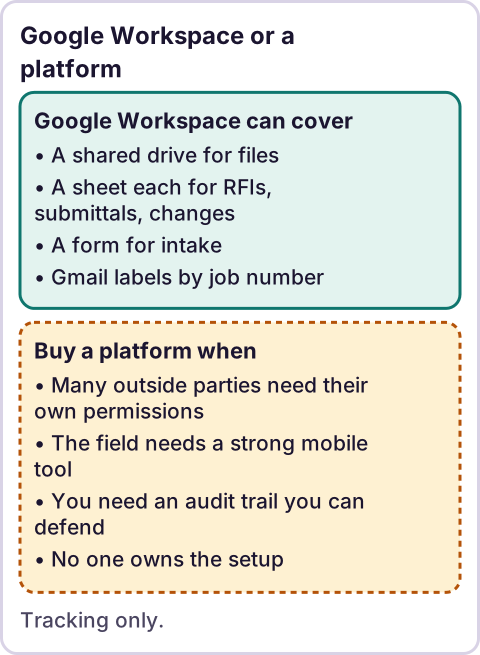
Diagram: Google Workspace or a platform.
What does a small GC office need to track?
This is my list. Your contract may require more.
- Files. Drawings, specs, contracts, photos, closeout documents.
- RFIs. A question, who it went to, the date and the answer.
- Submittals. What went out, when, the status and the return date.
- Changes. A request, a price, who approved it and when.
- Purchase orders. What was ordered, from whom, promised dates.
- Daily notes. Who was on site and what happened.
- People. Contacts for the owner, the architect, subs and suppliers.
- Follow-ups. Who owes the next move, and since when.
None of this is exotic. Each item is a row with a date and a status.
What can Google Workspace cover?
Here is how each piece maps.
| Need | Tool | How it works |
|---|---|---|
| Files | Shared drive | A fixed folder layout per job and a naming rule |
| RFI, submittal, change logs | Google Sheets | One tab per log, a status column, days-open formulas |
| Intake | Google Forms | A form that adds a row to the log |
| Gmail labels | A label per job number, applied by filter or script | |
| Reminders | Formulas or a script | Flag anything open too long |
| Approvals | Form plus script | A link that records a decision |
The pieces share one sign-in and one set of permissions, and the people on your team likely know them already. That is the real attraction: low cost to start and nothing new to learn.
Our post on what to automate first is a way to pick which log to build first.
Where does it run out?
These are the signs, in my judgment:
- Many outside parties. Subs, owners and architects need access to some things and not others. A sheet with 40 viewers is hard to keep private.
- A strong mobile field need. Photos, markups and daily reports from a phone in a muddy site work better in a tool built for it. Sheets on a phone is workable. It is not pleasant.
- Drawing markup and version control. A drive stores files. It does not manage sheets of a drawing set the way purpose-built software does.
- An audit trail you may have to defend. A sheet's history is editable by anyone with edit access. If you may need a record that holds up, ask your attorney what you need.
- Money flowing through it. Pay applications, retainage and lien paperwork come with rules. Tracking in a sheet is possible. Letting a sheet decide is not.
- No owner. A custom setup needs a person who understands it. Without one, it decays.
- Scale. Ten jobs at once strain a setup that was fine at three.
If several of these are true, price a platform.
When is buying the better call?
Often. A paid platform exists because the problems above are common, and its vendor has already solved them. You get permissions by role, mobile apps, markup, history and support. The cost is the subscription and the work of moving to it.
A fair way to decide:
- Count the pain. What did the last three missed follow-ups cost?
- Count the people. How many outside parties need access?
- Price both. Add the hours of building and upkeep to the Google side. Add the subscription and setup hours to the platform side.
- Ask for a trial. Run one real job in it before you commit.
- Ask what leaves with you. Can you export your data if you stop paying?
I have not compared any platform here, and I name none. I do not know which one fits your work.
What does a sensible Google Workspace start look like?
If you decide to start there, keep it small:
- Create a shared drive and a fixed folder layout. Files belong to the company, not a person.
- Build one log, probably RFIs, with a status column and a days-open formula.
- Add a form so requests arrive as rows.
- Agree on a job-number habit in email subjects.
- Name an owner and write a one-page handover note.
- Review in 60 days. If it works, add the next log. If it creaks, price a platform.
You are not locked in. The data is rows and files, and rows and files move.
Where does an LLM fit in this?
An LLM can help with the messy part: reading an email from a sub and suggesting which job, which log and which fields it belongs to, or summarizing a long thread into a few lines. A person should check what it suggests before it lands in a log, because a wrong entry looks the same as a right one. The logs, the reminders and the days-open math are plain rules. My stance: AI writes the code, plain automation runs it, and an LLM shows up only where the input is messy and a person checks the result. See also AI agents vs automation.
Where this has limits
- This is a judgment piece. I have no data on how many small GCs use each path or how it turns out.
- I have no field experience. I am not a contractor, project manager, attorney, insurer or safety professional.
- I compared no platform. I do not know which one, if any, fits you.
- I make no claims about what any rule or contract requires. Check with an attorney, insurer or safety professional on anything with legal, insurance or safety weight.
- We sell build work. I tried to be fair to paid platforms. Read it with that in mind.
- No ReRev prices and no promises about results.
If you want help deciding, or building the Google Workspace version, tell us what your office tracks. Do not send contracts, drawings, passwords or login details.
Frequently asked questions
Do small general contractors need construction management software?
Not always. Some can track paperwork in Google Workspace. Many outside parties, field use, drawing control or an audit trail point toward a platform.
What can Google Sheets track for a construction job?
RFIs, submittals, change requests, purchase orders, daily notes and follow-ups, each as a row with a date and a status.
When should I buy a platform instead?
When several of these are true: many outside parties, heavy mobile use, drawing markup, a need for a defensible record, money paperwork, no one to own a custom setup, or many jobs at once.
Is a Google Sheet a reliable record?
Anyone with edit access can change it. If you may need a record that holds up, ask your attorney.
Can I start in Google Workspace and move later?
Yes. The data is rows and files, which export cleanly. Check export options before you buy anything.
Do you recommend a platform?
No. I have not compared any, and the right one depends on your work.
Read next: The paperwork map shows the individual logs if a full system is more than you need, and build vs. buy automation frames the sheet-versus-software call.