Blog / Construction Operations
Weekly Owner Report for Construction, Built From Your Project Sheets
By Keyona Meeks, Founder, ReRev Labs · Oct 31, 2026 · 11 min read
The short answer: Keep three tabs in one Google Sheet: RFIs, change orders and schedule notes. A short Google Apps Script reads them every Friday and builds a Google Doc with the open RFIs, the change orders nobody has decided and the last week of schedule notes. It saves the Doc and a PDF to a folder and emails the PDF to the project manager, not the owner. The manager reads it, adds a note and forwards it. The script reports what is in the sheets. It does not decide what the owner is owed or told. I mock-tested the script; I did not run it in a live Google account.
By the end of this post, you'll be able to:
- Set up three tabs the report can read.
- Paste in a script that builds a Doc and a PDF each Friday.
- Keep a person between the script and the owner.
- Test it on a copy before it runs on a live project.
Friday afternoon, someone opens the RFI list, the change order list and the notes from the week, and copies the parts that matter into a document for the owner. It takes an hour. It is easy to get wrong when the lists are long, and it is the first thing to slip when the week is bad, which is when the owner most wants it.
I sell build work, so you should know I benefit if you hire us. This is a tracking tool for the paperwork you already have. It does not replace the person who knows the project.
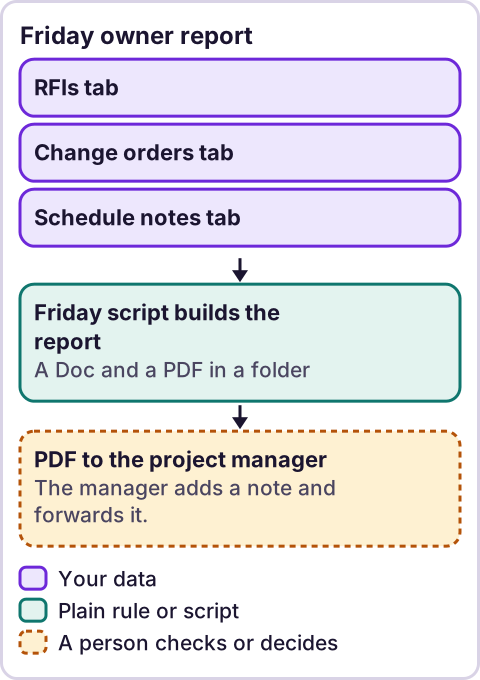
Diagram: Friday owner report.
What goes in a weekly owner report?
When I searched "construction weekly owner report template" on October 30, 2026, page one was template pages from document, forms and inspection-software sites, plus a few blog posts. Titles only. I did not review them and I name none. A template gives you headings. It does not fill them in.
Your contract decides what you must report, to whom and how often. As one federal example only, FAR 52.236-15 says the contractor "shall, within five days after the work commences on the contract" "prepare and submit to the Contracting Officer for approval three copies of a practicable schedule," and then "enter the actual progress on the chart as directed by the Contracting Officer." Source: FAR 52.236-15, checked October 30, 2026, read through a fetch tool that returned excerpts. The clause does not set a weekly interval. The interval comes from the person who directs it.
That clause covers federal contracts. Yours may ask for different things. Read your contract, and ask an attorney if you are unsure what it requires. This post covers a plain internal report. If your contract requires a formal report, build that one first.
This report has three parts, because those are the parts a sheet can hold:
- Open RFIs. What is waiting for an answer, and what is late.
- Change orders not yet decided. What was submitted, and how long it has waited.
- Schedule notes from the last week. What happened, in the project manager's words.
It does not cover pay applications, lien waivers, insurance, safety or cost. Track those in their own place and check with an attorney, insurer or safety professional on anything that carries legal, coverage or safety weight.
What do the three tabs need?
Make one Google Sheet with three tabs. The names and headers must match the script. If you change them, change the script too.
RFIs (one row per RFI): RFI, Subject, Status, Due, Ball in court
Change Orders (one row per change order): CO, Description, Status, Submitted, Approver
Schedule Notes (one row per note): Date, Note
Use real dates in the Due, Submitted and Date columns. A date typed as plain text will not count as late and will not show days waiting. Format the column as a date, then check that it right-aligns.
For Status, the script treats these as finished and leaves them out: for RFIs, Answered and Closed; for change orders, Approved, Rejected and Void. Everything else shows up as open. A dropdown on the Status column stops typos, and Google's help covers adding one. A typo would make a finished item look open.
How does the script build the report?
Each Friday it does five things:
- Reads the three tabs by header name, so adding a column does not break it.
- Lists open RFIs with the most overdue first and items with no due date last, with days late.
- Lists change orders not yet decided, with days waiting.
- Lists schedule notes from the last 7 days, newest first.
- Writes a Google Doc, saves a PDF of it in the same folder and emails the PDF to one person.
If a report for that date already exists in the folder, the script stops. That keeps a retry from sending two. If a tab or a header is missing, it stops with a message instead of sending a report with a hole in it.
The Doc starts with a line that says a script built it and a "Project manager notes" line to fill in. That is on purpose. The report goes to the project manager first.
Who should the report go to?
The script emails one address, set at the top as REPORT_TO. I set it to the project manager, not the owner. The manager reads the Doc, fixes anything that looks wrong, adds the note and forwards the PDF.
You could point it straight at the owner. I would not, for two reasons. A sheet can be wrong in ways a script cannot see: a status nobody updated, a note that says more than you want to say, an RFI marked open that was answered by phone. And the report is a message from your company. A person should own it.
Whether reports should ever go straight to the owner is your call. Start with the manager.
How do you set it up?
- Make a Drive folder for reports. Open it and copy the folder ID from the address bar. The ID is the long text after
/folders/. I know that from using Drive, not from a Google page I opened for this post, so check it. - Open the sheet. Choose Extensions, then Apps Script. If this is new to you, read what Google Apps Script is first.
- Delete the placeholder code and paste the script below.
- Change
PROJECT_NAME,REPORT_TOandREPORT_FOLDER_ID. - Click Save.
- In the function list, choose
buildWeeklyReportand click Run once, to test. Google asks you to allow the script to use your sheet, Docs, Drive and email. Read the list. Approve it only if you agree. - Check the Doc, the PDF and the email. If they look right, choose
setupWeeklyReportTriggerand click Run.
// Weekly owner report: builds a Google Doc and a PDF from three tabs, then emails the PDF to the project manager.
// Paste into Extensions > Apps Script in the sheet that holds your RFIs, change orders and schedule notes.

const PROJECT_NAME = 'Project name';
const REPORT_TO = 'pm@yourcompany.com';
const REPORT_FOLDER_ID = 'PASTE_FOLDER_ID_HERE';

const RFI_TAB = 'RFIs';
const CO_TAB = 'Change Orders';
const NOTES_TAB = 'Schedule Notes';

const RFI_DONE = ['answered', 'closed'];
const CO_DONE = ['approved', 'rejected', 'void'];
const NOTE_DAYS = 7;

function buildWeeklyReport() {
  const tz = Session.getScriptTimeZone();
  const today = startOfDay_(new Date());
  const name = PROJECT_NAME + ' weekly report ' + Utilities.formatDate(today, tz, 'yyyy-MM-dd');

  const folder = DriveApp.getFolderById(REPORT_FOLDER_ID);
  if (folder.getFilesByName(name).hasNext()) return;

  const rfis = readTab_(RFI_TAB, ['RFI', 'Subject', 'Status', 'Due', 'Ball in court'])
    .filter(function (r) { return r.RFI !== '' && RFI_DONE.indexOf(lower_(r.Status)) < 0; })
    .sort(function (a, b) { return dueKey_(a.Due) - dueKey_(b.Due); });
  const cos = readTab_(CO_TAB, ['CO', 'Description', 'Status', 'Submitted', 'Approver'])
    .filter(function (r) { return r.CO !== '' && CO_DONE.indexOf(lower_(r.Status)) < 0; });
  const cutoff = new Date(today.getTime() - NOTE_DAYS * 86400000);
  const notes = readTab_(NOTES_TAB, ['Date', 'Note'])
    .filter(function (r) { return r.Note !== '' && r.Date instanceof Date && r.Date >= cutoff; })
    .sort(function (a, b) { return b.Date - a.Date; });

  const doc = DocumentApp.create(name);
  const body = doc.getBody();
  body.appendParagraph(PROJECT_NAME + ': weekly report').setHeading(DocumentApp.ParagraphHeading.HEADING1);
  body.appendParagraph('Week ending ' + Utilities.formatDate(today, tz, 'MMM d, yyyy') +
    '. Built by a script from the project sheet. Read it before it goes to the owner.');
  body.appendParagraph('Project manager notes: ');

  body.appendParagraph('Open RFIs (' + rfis.length + ')').setHeading(DocumentApp.ParagraphHeading.HEADING2);
  if (rfis.length) {
    const rows = [['RFI', 'Subject', 'Status', 'Due', 'Days late', 'Ball in court']];
    rfis.forEach(function (r) {
      const late = r.Due instanceof Date && r.Due < today ? daysBetween_(r.Due, today) : '';
      rows.push([String(r.RFI), String(r.Subject), String(r.Status), fmt_(r.Due, tz), String(late), String(r['Ball in court'])]);
    });
    body.appendTable(rows);
  } else {
    body.appendParagraph('None.');
  }

  body.appendParagraph('Change orders not yet decided (' + cos.length + ')').setHeading(DocumentApp.ParagraphHeading.HEADING2);
  if (cos.length) {
    const rows = [['CO', 'Description', 'Status', 'Submitted', 'Days waiting', 'Approver']];
    cos.forEach(function (r) {
      const waiting = r.Submitted instanceof Date ? daysBetween_(r.Submitted, today) : '';
      rows.push([String(r.CO), String(r.Description), String(r.Status), fmt_(r.Submitted, tz), String(waiting), String(r.Approver)]);
    });
    body.appendTable(rows);
  } else {
    body.appendParagraph('None.');
  }

  body.appendParagraph('Schedule notes, last ' + NOTE_DAYS + ' days (' + notes.length + ')').setHeading(DocumentApp.ParagraphHeading.HEADING2);
  if (notes.length) {
    notes.forEach(function (n) {
      body.appendListItem(Utilities.formatDate(n.Date, tz, 'MMM d') + ': ' + String(n.Note));
    });
  } else {
    body.appendParagraph('None.');
  }

  doc.saveAndClose();
  const file = DriveApp.getFileById(doc.getId());
  file.moveTo(folder);
  const pdf = folder.createFile(file.getAs('application/pdf').setName(name + '.pdf'));

  MailApp.sendEmail({
    to: REPORT_TO,
    subject: name,
    body: 'The weekly report is attached.\n\n' +
      'Open RFIs: ' + rfis.length + '\n' +
      'Change orders not yet decided: ' + cos.length + '\n' +
      'Schedule notes this week: ' + notes.length + '\n\n' +
      'The Google Doc is in the report folder if you want to edit it before it goes to the owner:\n' +
      file.getUrl() + '\n\nPDF: ' + pdf.getUrl(),
    attachments: [pdf.getBlob()]
  });
}

function readTab_(tabName, wanted) {
  const sheet = SpreadsheetApp.getActiveSpreadsheet().getSheetByName(tabName);
  if (!sheet) throw new Error('No tab named ' + tabName);
  const values = sheet.getDataRange().getValues();
  if (values.length < 2) return [];
  const head = values[0].map(function (h) { return String(h).trim(); });
  const at = {};
  wanted.forEach(function (w) {
    at[w] = head.indexOf(w);
    if (at[w] < 0) throw new Error('Tab ' + tabName + ' is missing the column ' + w);
  });
  return values.slice(1).map(function (row) {
    const o = {};
    wanted.forEach(function (w) {
      const v = row[at[w]];
      o[w] = v instanceof Date ? v : String(v === null || v === undefined ? '' : v).trim();
    });
    return o;
  });
}

function lower_(s) { return String(s).trim().toLowerCase(); }
function startOfDay_(d) { return new Date(d.getFullYear(), d.getMonth(), d.getDate()); }
function daysBetween_(a, b) { return Math.round((startOfDay_(b) - startOfDay_(a)) / 86400000); }
function dueKey_(d) { return d instanceof Date ? d.getTime() : Number.MAX_SAFE_INTEGER; }
function fmt_(d, tz) { return d instanceof Date ? Utilities.formatDate(d, tz, 'MMM d, yyyy') : String(d); }

function setupWeeklyReportTrigger() {
  ScriptApp.getProjectTriggers().forEach(function (t) {
    if (t.getHandlerFunction() === 'buildWeeklyReport') ScriptApp.deleteTrigger(t);
  });
  ScriptApp.newTrigger('buildWeeklyReport').timeBased()
    .onWeekDay(ScriptApp.WeekDay.FRIDAY).atHour(14).create();
}
What does Google say about the pieces it uses?
Three small facts the script depends on, from Google's reference pages, checked October 30, 2026, each read through a fetch tool that returned excerpts:
- Making a PDF. The Blob reference says
getAsreturns "the data inside this object as a blob converted to the specified content type," and that for most blobs "'application/pdf' is the only valid option." Source: Class Blob. The page also saysgetAsreplaces whatever follows the last period in a file name with the new extension. The script sets the name after conversion for that reason. - Reading a Doc as a blob. The Document reference says
getAs"retrieves the current Document contents as a blob of the specified type." Source: Class Document. My script callsgetAson the Drive file for the Doc, not on the Document. I did not read the Drive File reference, so test step 4 checks the PDF. - Attaching it. The MailApp reference describes the
attachmentsoption as "an array of files to send with the email." Source: Class MailApp.
The weekly trigger uses onWeekDay and atHour. Google's ClockTriggerBuilder page says atHour "specifies the hour" the trigger runs. I found no promise of an exact minute, so expect it somewhere in that hour. Source: ClockTriggerBuilder. Check the time zone under Project settings, or the report may arrive at an hour you did not expect.
I could not confirm four things from the pages I read, and the test below covers each: that saveAndClose() is needed before the PDF is made (I call it to be safe), that getAs and moveTo work on the Drive file as written, and how a table with many rows looks in the PDF.
What do the installable trigger rules mean for this?
Google's installable triggers page says they "can call services that require authorization" and "always run under the account of the person who created them." Source: Installable triggers, checked October 30, 2026. The report and the email come from the account that ran setupWeeklyReportTrigger. Run it from a company account, not a personal one that someone may close.
Google's quotas page lists email recipients per day at "100" for consumer accounts and "1,500" for Google Workspace accounts, and says "All quotas are subject to elimination, reduction, or change at any time, without notice." Source: Quotas for Google Services, checked October 30, 2026. One report a week to one person is nowhere near either number.
How do you test it before the owner sees anything?
Test on a copy of the sheet, a copy of the folder and your own email address.
- Make copies, and set
REPORT_TOto yourself. - Fill the three tabs with fake rows: one RFI past due, one due next week, one Answered; one change order Pending for ten days and one Approved; three notes this week and one from last month.
- Run
buildWeeklyReport. Open the Doc. Check the counts in the headings and that the Answered RFI and the Approved change order are missing. - Open the PDF. Check that tables fit the page and nothing is cut off.
- Run it again the same day. Check that nothing new appears. That is the guard.
- Rename a header, such as
Due, and run it. Check that it stops with a message and sends nothing. - Put a date as plain text in one row. Check that the row shows, with no days late. Then fix the column format.
- Only then run
setupWeeklyReportTrigger, and pointREPORT_TOat the manager.
What can go wrong?
- The report is empty. Check the tab names and headers, spelled exactly.
- Everything shows as open. The Status text must match, ignoring capital letters and spaces.
Completeis not in the finished list. Add it to the list at the top. - Days late are blank. The Due cell is text, not a date.
- The PDF has a missing table. I could not confirm how Docs exports very wide tables. Keep columns short.
- It arrives at the wrong hour. Check the time zone under Project settings.
- The note section is empty. Notes older than 7 days are left out, and a row without a real date is skipped.
Where does an LLM fit in this?
Not in the building. The report is a list of rows with dates, and plain rules sort and count them better than a model. An LLM could help at the edges: a person pastes a long email thread about a delay and asks for a two-line schedule note. A person reads the summary and fixes it before it goes in the Notes tab. My stance: AI writes the code, plain automation runs it, and an LLM shows up only where the input is messy and a person checks the result. If you are unsure which of your steps to automate first, read what to automate first in a small business.
Where this has limits
- Not run in Google. I tested the logic in a mock with 23 checks. I have not run it in a live Google account.
- Unconfirmed behavior.
saveAndClose()before the PDF,getAsandmoveToon the Drive file and the look of wide tables in the PDF. - It reports the sheet, not the site. If the sheet is out of date, so is the report.
- It is not a contract document. Your contract decides what you must report. I am not a lawyer. If a report carries legal weight, ask an attorney.
- FAR 52.236-15 is a federal example. It may not apply to you.
- No cost, pay application, lien, insurance or safety content. Track those separately.
- One project per sheet. Several projects need several sheets or a change to the script.
If your Friday report is the job that never gets done, bring the workflow to us on /letstalk. If you want a standing owner of the weekly rhythm of reports, meetings and follow-ups, see our fractional chief of staff page. Do not send project data or passwords.
Frequently asked questions
Can Google Sheets make a weekly report for a construction project?
Yes. A script can read your RFI, change order and note tabs and write a Google Doc and PDF on a schedule. The one in this post does that.
Who should receive the report first?
The project manager. A person should read it, add a note and forward it. A script can build the report, but it cannot judge whether the sheet is right.
What does the report include?
Open RFIs with days late, change orders not yet decided with days waiting and schedule notes from the last 7 days.
Does this meet my contract's reporting requirement?
I cannot say. Your contract decides what a required report must contain. Read it, and ask an attorney if you are unsure.
What if a tab or header is missing?
The script stops with a message and sends nothing, so you do not send a report with a hole in it.
Can it send the report straight to the owner?
You can change REPORT_TO. I would start with the project manager, and send to the owner only once the sheet has proven reliable.
Read next: The daily report with Google Forms is where the field data comes from, and the RFI log and change order log feed the open-items section.