Blog / Product Brand Operations
Operations Automation for Product Brands: What to Automate After Orders Pile Up
By Keyona Meeks, Founder, ReRev Labs · Oct 31, 2026 · 10 min read
The short answer: Once orders pile up, the work that eats a small product brand is not selling. It is the repeated handoffs: order confirmations, returns, stock counts, wholesale inquiries, creator requests and review follow-ups. Automate in this order: first the handoffs that are the same every time and cost little if wrong, then the ones where a mistake reaches a customer, and keep a person on anything that spends money or promises something. Use plain rules for the rules. Use an LLM only where the input is messy, and have a person check what it produces.
By the end of this post, you'll be able to:
- Map the handoffs in your brand that are worth automating.
- Rank them by how much a mistake costs.
- Pick a first project that is safe to get wrong.
- Know where an LLM helps and where it should stay out.
I sell build work, so you should know where I stand: I make a living turning handoffs like these into working systems. This post is a map, not a pitch. It has no prices, no promised results and no claims about what any platform does that I did not read in its own documentation. Where I describe a method, it is a method, and you should test it on your own store.
I use "orders pile up" on purpose. I do not have a number, and a round figure like 100 a day is a way to talk, not a threshold I measured. The signal is simpler: someone on your team is re-typing the same thing for the third time this week.
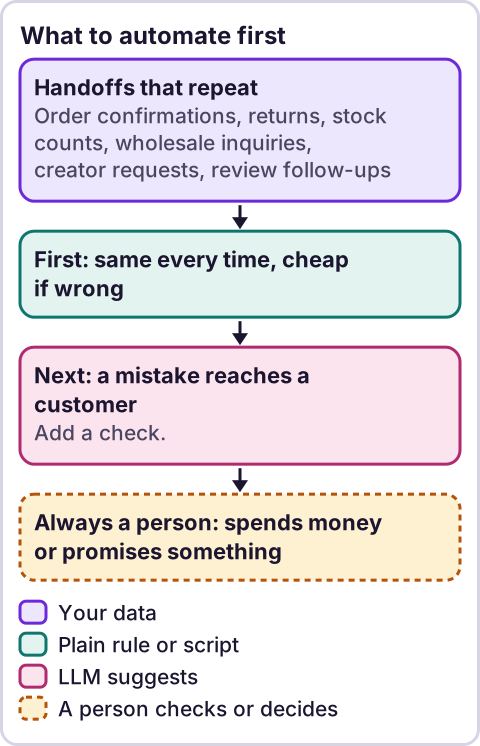
Diagram: What to automate first.
What do you automate first in a product brand?
Start with the handoff that is boring, frequent and low in risk. A handoff is any point where information moves from one person or tool to another: an order to a customer, a return request to a warehouse, a stock count to a purchase order.
Look for three things:
- It happens the same way every time. If you can write the steps on a card, a rule can run them.
- A wrong result is cheap and easy to catch. An internal alert that fires twice is cheap. An email that promises a refund is not.
- A person is doing it only because nobody set it up.
Order confirmations and internal notifications usually score well. Refunds and price changes do not. That ranking is my judgment, not a law.
Which handoffs can you automate, and in what order?
Here is the map I use. The "who checks" column is the point. Automation without a named checker is just a faster way to make mistakes.
| Handoff | What a rule can do | Who checks |
|---|---|---|
| Order confirmation | Send the same message when an order row appears | You, on a test order |
| Returns | Log each request in one table, send the label steps | A person approves any refund |
| Stock | Flag items below a level you set | A person places the order |
| Wholesale inquiries | Capture the form, route it, remind you after a few days | A person replies and quotes |
| Creator requests | Log requests, track what was sent | A person decides who gets product |
| Reviews | Ask after delivery, collect what comes back | A person replies to anything negative |
Notice what is missing: price changes, refunds, discounts and anything that tells a customer "yes." Those stay with a person until you have run the simpler ones for a while.
How do orders and confirmation emails get automated?
The cleanest first project. A new order lands in a table, a rule sends a message, and a column records that it was sent so it never goes twice. The pattern has three parts: a guard so it does not repeat, a stamp that says when it ran, and a test order you place yourself.
In Google Workspace the version of this is a short script and a test order. Your store platform may already send confirmations, so ask whether you need your own at all. The case for your own is when the standard message cannot say what your customers need to know, such as how to reach a person.
The order-side builds: send Shopify orders to a sheet without a paid app, order confirmation emails from that sheet, a daily sales summary email and alerts for late or stuck shipments.
How should returns be handled?
Returns are a pile of small decisions. Most of the work is not deciding. It is logging: who, which order, which item, what reason, what happened. A single table that every request lands in beats a thread of emails.
Automate the log and the first reply that explains the next step. Do not automate the refund. A person reads the reason, looks at the item and decides. That is where a customer is won or lost, and a rule cannot see the photo.
The build: a return request form and returns log in Google Sheets, with status emails included.
How do you keep track of stock without a big system?
Start smaller than you think. A sheet with an item, a count, a level at which to reorder, and one rule that flags rows below the level is a real system. The flag is a prompt. A person decides what to order, because lead times, minimums and cash are not in the sheet.
The risk to watch is stale counts. A flag built on a wrong count is a confident wrong answer. Decide who updates the counts and how often, and write it down.
The stock builds: the reorder point formula, low-stock alerts from a sheet, a purchase order tracker that chases suppliers and a back-in-stock waitlist without a paid app.
What about wholesale inquiries?
Wholesale inquiries are few and valuable, which makes them the easiest to lose. The usual failure is not a bad reply. It is no reply, because the form went to an inbox nobody owns.
Automate the capture and the reminder. One form, one table, a named owner, and a nudge if a row has no reply after a set number of days. A person writes the answer. A message that quotes terms is a commitment.
The wholesale builds: an inquiry form that scores and answers itself and reorder reminders for wholesale accounts.
How do you run creator and gifting requests?
Treat it like wholesale at a smaller scale. Log who asked, what you sent, when, and what you expect back. The spreadsheet is the memory. People forget what they promised, and the log does not.
A person decides who gets product. If an LLM helps by reading a messy inbound message and pulling out the handle, the product they want and their address, a person confirms the fields before anything ships.
The creator builds: an outreach tracker with follow-up drafts and a usage rights tracker for the content that comes back.
How do you ask for reviews without annoying people?
Ask once, after the order should have arrived, and make it easy. A rule can time the request from the delivery date. It cannot judge tone, so replies to unhappy customers go to a person, quickly.
I will not tell you how many reviews this produces. I do not have a number I can stand behind.
The build: ask for a review after delivery, without forgetting anyone.
Where does an LLM fit in this?
In one place: where the input is messy and a person checks the result. A return reason typed as a paragraph, a wholesale inquiry that arrives as a long email, a creator message with the details buried: an LLM can pull out the fields and suggest a category. It can draft a reply for a person to edit.
It does not run the order confirmation, the stock flag or the reminder. Those are rules, and rules do the same thing every time. My stance: AI writes the code, plain automation runs it, and an LLM shows up only where the input is messy and a person checks the result.
For the question of what to automate at all, start with what to automate first. For the difference between a rule, an agent and a person, read AI agents vs automation. If you wonder why some projects stall, read why AI agents fail.
One working example of that one-spot rule: sorting a customer service inbox in Gmail, where an LLM suggests the label and a person approves it.
How do you pick the first project?
Use this short test on each handoff in the table:
- Can I write the steps on a card?
- If it goes wrong, who notices, and how fast?
- Does it touch money or a promise to a customer?
- Who owns it on the day it breaks?
Pick the one with yes, someone-notices-fast, no, and a named owner. Build that one. Run it beside the manual way for a week. Compare the counts. Only then move to the next.
What should you not automate yet?
- Refunds, discounts and price changes.
- Replies to upset customers.
- Anything that sends a message to your whole list.
- Anything you cannot explain to a new hire in five minutes.
The last one is the real filter. If you cannot say what the steps are, the problem is the process, not the tooling.
Where this has limits
- This is a map, not a study. I have no data on how much time any of this saves, and I do not claim any.
- I did not review any store platform's documentation for this post. Check what yours already does before you build.
- Your brand is not mine. Volume, margins and team size change the order.
- Each section is a summary. Each handoff deserves its own walkthrough, and this post does not give one.
- No ReRev prices and no promises about results.
If you want help, see our AI operations service or tell us where your team is stuck. Bring the list of handoffs and who does each today. Do not send customer data, passwords or login details.
Frequently asked questions
What should a product brand automate first?
A handoff that is the same every time and cheap to get wrong, such as an internal alert or a confirmation message.
Can I automate returns?
You can automate the log and the first reply. Keep the refund decision with a person.
Do I need new software to automate operations?
Not always. A shared table and a few rules go a long way. Check what your current tools do before you buy more.
Where does an LLM help in operations?
On messy input, such as a long return reason or a wholesale email. A person checks what it produces.
What should I never automate?
Refunds, discounts and messages to your whole list, until a person has run the simpler handoffs for a while.
How do I know it is working?
Run it beside the manual way for a week and compare the counts. If they match, move on.